
To navigate these metrics, go to Clinic Optimisation tab > Quality Improvement.
Note: Some QI metrics may not be available for MedicalDirector customers. The QI Cabinet is not available for Zedmed customers. Patient Impact metrics require Clinical Permissions - find out how to grant these here.
Key areas covered in this article:
How the QI Cabinet Works
Every QI Metric provides the same three sections:


Ensure to review tooltips to understand the details within each section for additional insights.

Step 1: Review your data
Start by exploring the percentages and trend graphs for each measure. This helps you understand where your gaps are and where your practice needs to focus its attention.
The Goal will show the practice's current percentage of RACGP active patients who have the required details (e.g. smoking status, Flu vaccination, completed Health Assessment) recorded and/or up to date.
When reviewing a Quality Improvement Measure over a selected reporting period (such as a month or quarter):
- The percentage shown represents the value recorded on the final date of that period.
- This can be measured against the practice goal or threshold, which can be amended in the Settings area of Cubiko (see Step 2).
Step 2: Set Your Goal or Threshold
Cubiko allows your practice to set a Goal for specific Quality Improvement (QI) metrics to work towards as a target.
Some QI metrics use a Threshold rather than a Goal. A Threshold represents a maximum acceptable limit - a level your practice should not exceed.
By reviewing these figures, you can:
- Understand whether your targets are realistic
- See how far you are from your goal
- Identify where improvement efforts will have the greatest impact
Top tip: Not sure where to start? Look for measures with the biggest gap between your current performance and the recommended benchmark. You can also use Touchstone QI to see both how your practice is performing and how your cohort is performing.
To set or update your practice goals, head to Settings > QI Goals. The goals you set here will be reflected in the metrics (after an overnight/extraction update, these goals will populate in your practice dashboard).
Once you have set a practice goal, you can track:
- The percentage of your goal completed, and
- The required actions to reach your target.
Record your targets in a Plan Do Study Act (PDSA) cycle
Step 3: Take Action
For each activity, you can view key patient lists and commence steps to improve your data, reach your goal, or identify gaps in your workflow to stay under your threshold.
This will vary for each QI activity.
Patient lists can help you work towards your goal by showing patients requiring updating or the specified service, and can be broken down by those with:
- Patients with upcoming appointments - for opportunistic care
- Patients with no booking - so you can proactively reach out
Use the filters on the left and table filters to refine your lists. See the Key Filters section below for more details.
Use percentages and trend graphs to review and regularly track progress, and ensure you are:
- On track to reach your goal, or
- Staying below your threshold (where a threshold is used).
Step 4: Record Your Outcomes
Log your actions, measurements, and next steps in your Plan, Do, Study, Act (PDSA) cycle. This helps you track progress over time and plan future improvements.
Download a free PDSA template here: Plan Do Study Act (PDSA) cycle.
QI Metrics
Patient Impact
These measures focus on clinical quality and preventive care.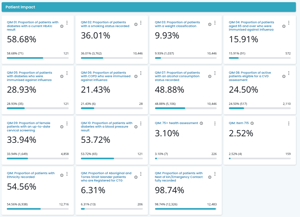
QIM 01 to QIM 10 are aligned with and based on the specifications of the Department of Health and Aged Care's PIP Quality Improvement Measures.
-
QIM 01: Patients with Diabetes with a Current HbA1c Result (Bp)
-
QIM 02: Proportion of Patients with a Smoking Status Recorded (Bp)
-
QIM 03: Proportion of Patients with a Weight Classification (Bp)
-
QIM 04: Patients Aged 65+ Immunised Against Influenza Available (Bp)
-
QIM 05: Proportion of Patients with Diabetes Immunised Against Influenza (Bp)
-
QIM 06: Proportion of Patients with COPD Immunised Against Influenza (Bp)
-
QIM 07: Proportion of Patients with an Alcohol Consumption Status Recorded (Bp)
-
QIM 09: Female patients with an up-to-date cervical screening (Bp)
-
QIM 10: Proportion of Patients with Diabetes with a Blood Pressure Result (Bp)
-
QIM: 75+ Health Assessment (Bp & MD)
-
QIM: Item 715 (Bp & MD)
-
QIM: Proportion of Patients with Ethnicity Recorded (Bp & MD)
-
QIM: Proportion of Aboriginal and Torres Strait Islander Patients Registered for CTG (Bp)
-
QIM: Proportion of patients with Next of Kin/Emergency Contact fully recorded (Bp)
Operational Impact
These measures focus on practice workflows and billing. 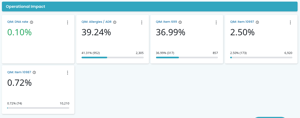
-
QIM: DNA Rate (Bp & MD)
-
QIM: Allergies / ADR (Bp)
-
QIM: Item 10997 (Bp & MD)
-
QIM: Item 10987 (Bp & MD)
QIM 01 - Patients with Diabetes with a Current HbA1c Result
Type: Goal
What it tracks: Active patients with Type 1 or 2 diabetes who have an HbA1c result recorded in the past 12 months, and those who may be overdue.
Where the data comes from: Patient records: Active Problems (recorded diabetic) + Investigations (HbA1c result not completed in the last 12 months)
Additional information:
Excluded patients: those with secondary diabetes, GDM, impaired fasting glucose, or impaired glucose tolerance.
QIM 02: Proportion of Patients with a Smoking Status Recorded
Type: Goal
What it tracks: RACGP active patients with a smoking status recorded.
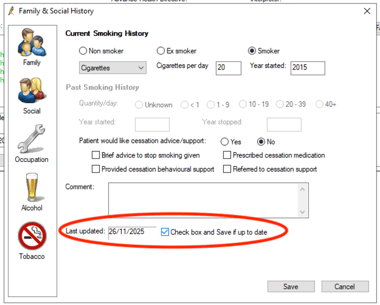
Where the data comes from: Patient records: Family & Social History > Tobacco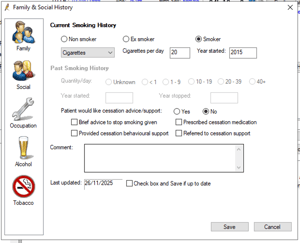
Additional information:
In line with The Department of Health and Aged Care specifications, a patient aged 15 years and over is counted as having their smoking status recorded if:
- The patient is 15 to 29 years old and their status has been recorded in the last 12 months, or
- The patient is aged 30 years or older and their status has been recorded at least once since turning 30
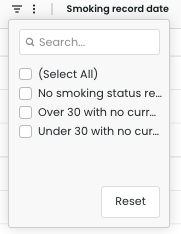
NOTE: You can use the table to view and filter patients based on the smoking status category to understand why they are appearing on this list.
If you have reviewed the patient's smoking status and nothing has changed since the last recorded status, tick the "Check box and Save if up to date" in the patient's file. This will update the Last updated date.
QIM 03: Proportion of Patients with a Weight Classification
Type: Goal
What it tracks: RACGP active patients aged 15+ with a BMI recorded in the past 12 months.
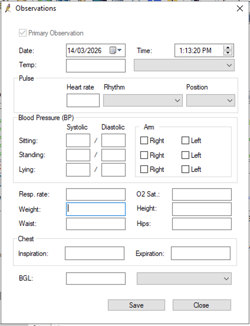
Where the data comes from: Patient records: Observations > Weight
Additional information:
In line with The Department of Health and Aged Care specifications, a patient is counted as having their weight classification status recorded if:
- The patient is aged 15 years or over
- The patient has had their weight recorded or updated within the last 12 months
QIM 04: Patients Aged 65+ Immunised Against Influenza
Type: Goal
What it tracks: RACGP active patients over 65 with a flu vaccine in the last 15 months.
Where the data comes from: Patient records: Demographics (age) + Immunisations
Additional information:
Some clinical specifications cannot be met. Cubiko is unable to exclude patients from the below measurement if they:
- Did not receive the vaccination due to medical or system reasons, or because they refused it.
Top tip: Use the Vaccination support: Flu vaccine cabinet in conjunction with this QIM to support a wider practice project for offering and providing flu vaccinations to all patients.
QIM 05: Patients with Diabetes Immunised Against Influenza
Type: Goal
What it tracks: RACGP active patients with diabetes who have had a flu vaccine in the last 15 months.
Where the data comes from: Patient records: Past History > Active Problems (Diabetes) + Immunisations
Additional information:
Patients with gestational diabetes who also have Type 2 diabetes are included.
QIM 06: Patients with COPD Immunised Against Influenza
Type: Goal
What it tracks: RACGP active patients with COPD who have had a flu vaccine in the last 15 months and 3+ visits in the last 2 years.
Where the data comes from: Patient records: Past History > Active Problems (COPD) + Immunisations
Additional information:
NOTE: QIM 04, 05 and 06: Cubiko cannot exclude patients who declined vaccination, or those who were vaccinated outside the practice without it being recorded in the PMS.
QIM 07: Proportion of Patients with an Alcohol Consumption Status
Type: Goal
What it tracks: RACGP active patients aged 15+ who have ever had an alcohol consumption status recorded.
Where the data comes from: Patient Files: Family & Social History > Alcohol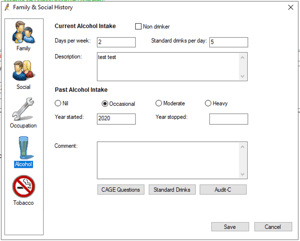
Additional information:
A patient aged 15 years and over is counted as having their alcohol status recorded if the status has ever been recorded.
Note: Patients with merged files may appear on the Patient list for actioning, but appear to have complete details on file. A patient's alcohol status may require additional updating if the merge date is later than the alcohol status update date.
This is a great opportunity to review and update a patient's alcohol status to ensure accuracy.
QIM 08: Patients Eligible for a CVD Assessment
Type: Goal
What it tracks: RACGP active patients who have the necessary risk factors recorded to enable a CVD assessment, including smoking status, blood pressure, cholesterol, glucose, age, and sex.
Where the data comes from: Patient records: Clinical risk factors
Active patients will be shown in this calculation if they do not have a coded diagnosis of CVD and may be eligible for a CVD assessment.
Additional information:
To be considered as possibly eligible for a CVD assessment, Cubiko identifies if a clinical risk factor has been recorded or not recorded, these include whether the patient has;
- A current (within the last 12 months) tobacco smoking recording.
- A current (within the last 2 years) systolic blood pressure recording.
- A current (within the last 2 years) total cholesterol and HDL recording.
- A current (within the last 2 years) fasting glucose or HbA1c test result or a diabetes diagnosis.
- Has their age and sex recorded.
Patients on these lists are aged between 45-74 years if they do not identify as Indigenous and 35-74 if they do identify as Aboriginal and/or Torres Strait Islander.
Note: If a patient refuses a measurement, it will show as not recorded.
QIM 09: Female Patients with an Up-to-Date Cervical Screening
Type: Goal
What it tracks: RACGP active female patients between the age of 25 and 74, who have not had a hysterectomy and have had a cervical screening within the last 5 years or since turning 25.
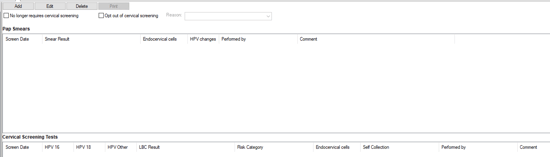
Where the data comes from: Patient records: Cervical Screening
Additional information:
This guide will assist to ensure the results are correctly entered into the Cervical Screening page. Bp Guide - Cervical Screening
QIM 10 — Patients with Diabetes with a Blood Pressure Result
Type: Goal
What it tracks: RACGP active patients with diabetes who have a blood pressure result recorded in the past 6 months.
Where the data comes from: Patient records: Past History > Active Problems (Diabetes) + Observations > BP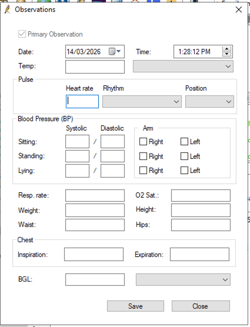
Additional information:
Patients with gestational diabetes who also have Type 2 diabetes are included.
QIM: 75+ Health Assessment
Type: Goal
What it tracks: The percentage of patients aged 75+ who have had a health assessment billed in the last 12 months.
Where the data comes from: Patient records: Demographics (age) + Billing History
Additional information:
Measures will show the percentage of patients who received a health assessment in the last quarter, out of all potentially eligible patients during that quarter.
Potential revenue is based on item 703 (gap fees excluded).
Top tip: Add the "Health Assessment Workflow" dashboard to MyDashboard and share it with your team!
QIM: Item 715
Type: Goal
What it tracks: What it tracks: Progress towards your practice goal for services to patients eligible for item 715 (or equivalent).
Where the data comes from: Patient records: Demographics (ethnicity) + Billing History
Additional information:
Eligibility is based on patient demographics and historical billings of items 715, 92004, 92016, 228, 92011, and 92023.
QIM: Proportion of Patients with Ethnicity Recorded
Type: Goal
What it tracks: The proportion of RACGP active patients with ethnicity recorded.
Where the data comes from: Patient records: Demographics (ethnicity)
Additional information:
Aligned with RACGP 5th Edition Standards (Criterion QI2.1), which requires at least 75% of active patient records to include ethnicity and cultural background.
The patient lists on this QIM includes patients whose ethnicity has not been recorded (not recorded) or provided (not provided). These can be filtered within the table.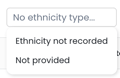
QIM: Proportion of Aboriginal and Torres Strait Islander Patients Registered for CTG
Type: Goal
What it tracks: The proportion of Aboriginal and Torres Strait Islander RACGP active patients registered for Close the Gap (CTG) at your practice.
Where the data comes from: Patient demographic details: Ethnicity record + CTG recorded status
Additional information:
Top tip: Ensure your practice proportion of patients with ethnicity recorded is meeting your goal so you can identify all patients that may be eligible for CTG.
QIM: Proportion of Patients with Next of Kin/Emergency Contact Fully Recorded
Type: Goal
What it tracks: Completion of next of kin/emergency contact records.
Where the data comes from: Patient demographic details:
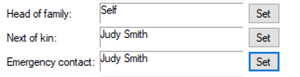
Additional information:
How the status is defined:
-
Fully completed - Surname and phone number recorded
-
Partially completed - Surname or phone number recorded
-
No information - Neither recorded
Use the completion status filter to find patients coming in today with incomplete records.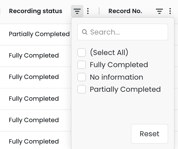
Note: A patient may appear as having "No information" if their NOK/ER details are linked only to the listed Head of Family.
This link will appear to populate the NOK/ER items in Bp; however, these details do not save and extract the NOK/ER tables into Cubiko.
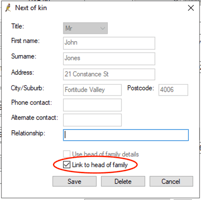 You can update this by unticking "Link to head of family", ticking "Use head of family details" and saving. Return to the NOK/ER section, retick "Link to head of family" and save.
This is a great opportunity to review if the Head of family is still the NOK/ER if the patient has become an adult since the NOK/ER was set.
QIM: DNA Rate
Type: Threshold (Maximum acceptable limit)
What it tracks: The proportion of appointments in the selected period where the patient did not attend the booked appointment.
Where the data comes from: Patient appointment status in your practice appointment book.
Additional information:
Appointments must be marked as DNA/No Show in your Practice Management Software to appear here.
Top tip: Take consistent steps to reduce DNAs and set patient expectations.
- Check unconfirmed appointments daily - especially for patients with a DNA history
- Use the Frequent DNAers list to create policies for repeat non-attenders
- Support any cancellation fee processes with the DNA history data
Additional ideas to reduce DNA rates:
-
Have a clear DNA policy
-
Send appointment reminders in advance
-
Consistently record patient attendance
QIM: Allergies / ADR
Type: Goal
What it tracks: The proportion of RACGP active patients with allergies or adverse drug reactions (ADR) recorded.
Where the data comes from: Patient records: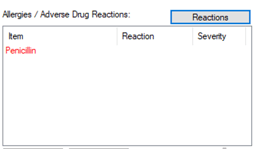
Additional information:
This metric aligns with RACGP 5th Edition Standards (Criterion QI2.1), which requires at least 90% of active patients to have allergies/ADRs recorded. Data available from July 2021 or your Cubiko start date.
Top tip: Include allergies on new patient registration forms, have nurses record clinical data before the practitioner appointment, and offer patients a form to update allergies while they wait.
QIM: Item 699 (Heart Health Check)
Type: Goal
What it tracks: Patients identified as potentially eligible for a Heart Health Check (MBS Item 699) and completion progress.
Where the data comes from: Patient billing history, demographics, clinical indicators recorded at your practice
Additional information:
Patients included on this page fall in line with the Heart Foundation's Heart Health Check eligibility guidelines:
- Patient aged 45 - 79
- Patient is Diabetic aged 35 - 79
- Patient is Aboriginal or Torres Strait Islander aged 30 - 79
For further details about item eligibility, please refer to the MBS descriptor
Patients are not eligible if a health assessment has been billed in the previous 12 months or if they are in residential aged care.
See the Heart Foundation's Heart Health Check Toolkit for useful resources.
QIM: Item 10997
Type: Goal & Threshold (Maximum acceptable limit)
What it tracks: Proportion of available 10997s billed (Goal), and possible missed opportunities for item 10997 (and Telehealth and Telephone equivalents) (Threshold).
Where the data comes from: Patient billing history at your practice.
A patient is eligible if they have had items 965, 967, or 731 billed (including 721, 723, and 732 items billed before 1 July 2025) and have had fewer than 5 x 10997s billed this calendar year.
Additional information:
Calculated revenue excludes gap fees. Always refer to MBS Online and confirm with practitioners for billing decisions.
This QIM has two tabs:
- Potential 10997s — upcoming opportunities (Goal)
- Historical 10997s — missed billing opportunities (Threshold)
Top tip: Create a dedicated appointment type in your practice management software for 10997. This will assist in both tracking and actioning these items.
- Encourage the team to check these lists daily. The Possible Service Opportunities Today metric can also be used for Opportunistic Patient Engagement, ensuring eligible services are offered when patients attend appointments.
- Review historical opportunities against nurse notes and clinical records to determine if the service is suitable for billing.
QIM: Item 10987
Type: Goal & Threshold (Maximum acceptable limit)
What it tracks: Proportion of available 10987s billed (Goal), and possible missed opportunities for item 10987 (and Telehealth and Telephone equivalents) (Threshold).
Where the data comes from: Practice billing data. A patient is eligible if they have had item 715 billed at the practice in the past 12 months and fewer than 10 x 10987s this calendar year.
Additional information:
Calculated revenue excludes gap fees. Always refer to MBS Online and confirm with practitioners for billing decisions.
This QIM has two tabs:
- Potential 10987s — upcoming opportunities (Goal)
- Historical 10987s — missed billing opportunities (Threshold)
Top tip: Use 'Possible Service Opportunities Today > 10987' for a daily nursing list, and create a dedicated appointment type for 10987 to make tracking and action easier.
- Encourage the team to check these lists daily. The Possible Service Opportunities Today metric can also be used for Opportunistic Patient Engagement, ensuring eligible services are offered when patients attend appointments.
- Review historical opportunities against nurse notes and clinical records to determine if the service is suitable for billing.
Filters
Use the filters across the QI Cabinet to get the most relevant view for your practice.
Left-hand side filters:
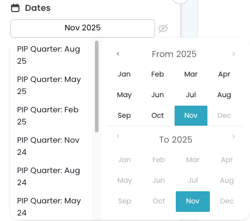
- Dates: Month and PIP quarter - adjust the date range to align with your reporting period
- Next appointment with: filter to show specific practitioners with patients requiring updates/actions/
- Usual doctor - filter to show a list of patients with the specified doctor recorded as their usual doctor in your practice management software.
If this field has not been completed, you can review our Patient preferred practitioner metrics to assist with updating this in your PMS.
- Last doctor seen - The last doctor the patient had a completed appointment with.
- Appointment type - the next appointment type a patient has booked (if applicable)
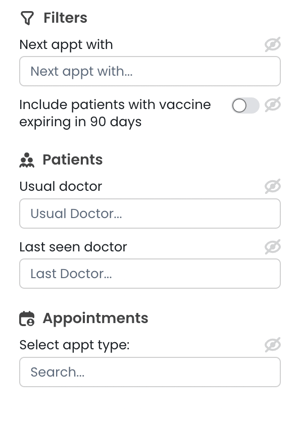
Table filtering:
Detailed information on how to customise tables can be found here: Customisable tables
-
To filter within the patient lists, use the filter icon
 in the column header.
Click the icon and enter your desired criteria using the drop-down options (contains, does not contain, equals, does not equal, begins with, ends with, blank, not blank) and type in the custom filter you wish to apply.
- Use the toggle to Include "RACGP Active" patients (patients who have 3+ attended, billed, or completed appointments in the last 2 years, who are not marked inactive or deceased).
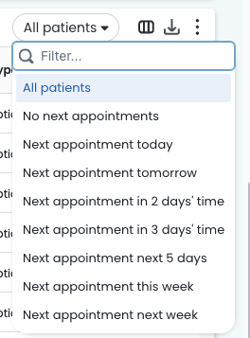
- Use the 'Patients with...' drop-down on the right-hand side of the table. Select the option to review this list daily or view it ahead of time to proactively book patients.
- Use the Actions column to track actions for each row in the table. Actions are shared between all viewers at this practice.
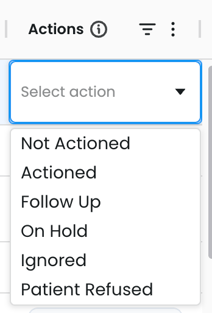
TOP TIP: Drag the 'Actions' column to your preferred spot or hide it entirely; Cubiko will remember your settings each time you return.
Hover over any action to see who last updated it and when, making team collaboration even easier.
Earning CPD Points Through QI
QI activities can count towards CPD! The My CPD Outcomes cabinet lets practitioners earn CPD hours while completing Quality Improvement activities.
Full details on My CPD Outcome can be found here: My CPD Outcomes