
Cubiko workflows for Receptionists: Checklist of key metrics to look through on a daily, weekly, and monthly basis
Our Customer Success Team has helped design role-based workflows that outline the key metrics each team member should review. These cover what to look at daily, weekly and monthly, making it easier for your team to build consistent habits with data.
Of course, every practice is individual and will have different priorities, so you may like to change the frequency of these metrics for your practice in a way that suits you and your team best.
Download our Cubiko workflows for receptionists document and the My Dashboards link with the metrics specifically for your reception team.
Download the Cubiko Workflows for Receptionists here
Download the My Dashboards - Reception workflow template here
NOTE: Certain cabinet and clinical permissions are required to view and action some of these metrics for 👤 Senior Receptionists and 2ICs. If you do not currently have access, speak with your Practice Manager or account administrator to confirm whether permissions should be updated for you.
Some metrics may only be available to our Best Practice software integration customers.
Here you will find resources and training videos on how you as a Receptionist, can use Cubiko.
This article provides the following:
- Download the Reception workflow and My Dashboards - Reception workflow
- Daily workflow information
- Weekly workflow information
- Monthly workflow information
- Free training course for Receptionists
- Actionable Columns
- Patient Contacts Feature
- Links to webinars and resources of interest
Daily
| Metric | Navigation to metric | About this metric |
|
Possible Service Opportunities Today
|
Clinic Insights tab > Today's Clinic Metrics |
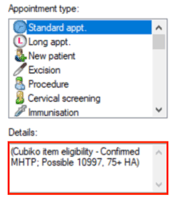
This metric brings together the tools your team needs to identify and act on patient care opportunities throughout the day. It shows a list of patients with appointments today who may be eligible for services such as Health Assessments, GPCCMPs or vaccines. You can filter the list before sharing it with practitioners to highlight the services your practice wants to prioritise. QuickCheck: 📌 Please note, QuickCheck is not part of the standard Cubiko subscription. QuickCheck - getting started.
✅ This metric may be managed by any admin team member, depending on your practice workflows. |
| Unconfirmed appointments today | Clinic Insights tab > Today's Clinic Metrics |
This helps reception teams quickly identify patients who still need to confirm attendance, including those with a history of frequent Did Not Attends (DNAs), so you can follow up as needed. We recommend checking unconfirmed appointments early each morning to support smooth clinic flow and reduce last-minute gaps in the schedule. |
| MyMedicare eligible patients with an appointment today | Clinic Insights tab > Today's Clinic Metrics |
See patients attending today’s appointments who are eligible to register for MyMedicare but are not yet registered at your practice. This helps reception teams flag potential registration conversations at check-in. |
| Appointments that may not be eligible for Medicare-subsidised Telehealth services | Clinic Insights tab > Today's Clinic Metrics |
Identify patients booked for a Telehealth appointment who may not meet Medicare eligibility requirements, based on whether a face-to-face item has been billed in the last 12 months. This helps admin teams look ahead and flag appointments that are not eligible for Medicare-subsidised Telehealth services. Use this list to contact patients and advise that they may be required to pay a private fee for their Telehealth service because they do not meet the current Medicare rebate eligibility criteria. ✅ This metric may be managed by any admin team member, depending on your practice workflows. |
| Outstanding Debt | Clinic Insights tab > Today's Clinic Metrics |
Identify patients with unpaid accounts who are attending an appointment today. This metric helps reception teams flag outstanding balances ahead of the patient’s visit, supporting timely conversations at check-in and helping reduce the risk of bad debt. ✅ This metric may be managed by any admin team member, depending on your practice workflows. |
| Recalls | Clinic Insights tab > Today's Clinic Metrics |
Get a clear view of outstanding recalls at your practice, including how many are due, how they are grouped by category and how long they have been waiting. We recommend the admin team review this list daily to identify required follow-up and support timely patient contact ✅ This metric may be managed by any admin team member, depending on your practice workflows. |
| Outstanding Rejections | Clinic Insights tab > Today's Clinic Metrics |
This metric shows your current level of Medicare and DVA rejections and highlights the average age of any outstanding invoices. It helps the Admin team stay on top of claims that need correction or resubmission. Medicare allows up to 12 months from the date of service to resubmit a rejected invoice, so keeping an eye on this list each day is important. Regular review ensures rejected items are corrected early, preventing delays in payment and keeping cashflow steady. 👤 This metric is best managed by Senior Receptionists or 2ICs, depending on your practice workflows. |
| Unbatched Invoices | Clinic Insights tab > Today's Clinic Metrics |
Identify invoices that have been created but not yet batched and submitted to Medicare or DVA. This metric helps highlight claims that are waiting to be processed, supporting timely batching and reducing delays in reimbursement. 👤 This metric is best managed by Senior Receptionists or 2ICs, depending on your practice workflows. |
| Investigations, contacted not given | Clinic Insights tab > Today's Clinic Metrics |
View a list of investigations (results or correspondence) where a patient has been marked as contacted, but the investigation result has not yet been recorded as given by the provider. This metric acts as an auditing tool, helping identify gaps between investigation results being received, and confirmation that results have been communicated to the patient. This list can be reviewed and filtered by practitioner, then downloaded and shared regularly with practitioners so they can confirm that outstanding investigation results have been provided to their patients. 👤 This metric is best managed by Senior Receptionists or 2ICs, depending on your practice workflows. |
Weekly
| Metric | Navigation to metric | About this metric |
| Appointments with no rebookings |
Clinic Optimisation tab > Appointment optimisation cabinet > Rebooking rate metric > Appointments with no rebookings.
|
View completed patient appointments that do not currently have a future appointment booked within the next 36 months. This metric helps reception teams identify patients who have not been rebooked following appointment types where ongoing follow-up is usually expected. Reception teams can use this list to contact patients who did not rebook and assist with scheduling their next appointment, supporting continuity of care and improving rebooking rates. ✅ This metric may be managed by any admin team member, depending on your practice workflows. |
| Appointment Day Sheet by appointment type | Clinic Optimisation tab > Appointment optimisation cabinet |
Get an overview of upcoming patient appointments for the day. This metric provides visibility of key patient information ahead of time and can be especially helpful during planned or unplanned disruptions, such as power outages or natural disasters. |
| Appointments to be rebooked | Clinic Optimisation tab > Appointment optimisation cabinet |
Identify patients who are booked for appointments where the practitioner is marked as away or unavailable. This metric helps reception teams identify in bulk, and reschedule appointments affected by practitioner leave or planned clinic closures. |
| Upcoming Telehealth patients who are not MyMedicare registered | Clinic Optimisation tab > Appointment optimisation cabinet | Identify patients with upcoming Telehealth appointments who are not registered with your practice for MyMedicare and may therefore not be eligible for extended (Levels C and D) MBS-funded telephone consultations. |
| After hours appointment does not match billing | Clinic Optimisation > Billing optimisation > Operational tab |
Identify appointments that occurred after hours, as defined by the MBS, where after hours item numbers were not billed. This includes appointments that were billed using standard consultation items instead of after hours items, as well as appointments that do not have any billing recorded on the same service date This metric helps highlight potential billing differences where after hours item numbers may have been applicable, providing visibility of missed or incorrect billing. It can also be used to identify appointments that occurred after hours and have not yet been billed or batched, allowing these to be reviewed and corrected where appropriate. 👤 This metric is best managed by Senior Receptionists or 2ICs, depending on your practice workflows. |
| Uncompleted patient appointments | Clinic Optimisation > Billing optimisation > Operational tab |
This metric shows all appointments that have not been marked as completed for the selected time period. It includes both patient appointments and other appointment types, helping you identify sessions that still need closing off in the appointment book. Staying on top of uncompleted appointments supports accurate billing, cleaner data and smoother end-of-day workflows. 👤 This metric is best managed by Senior Receptionists or 2ICs, depending on your practice workflows. |
| Unbilled appointments | Clinic Optimisation > Billing optimisation > Operational tab |
This metric is a great way to identify any missed billing opportunities, which may occur if a doctor does not process billing at the end of the consult or day. With practices facing increasing financial pressures, identifying unbilled appointments helps protect cash flow and supports the financial stability of the business. 👤 This metric is best managed by Senior Receptionists or 2ICs, depending on your practice workflows. |
| Billings on hold | Clinic Optimisation > Billing optimisation > Operational tab |
This metric gives you visibility of all invoices that have been placed on hold and are waiting to be finalised. Reviewing this list each week helps you keep billing moving, reduce delays in payments and avoid missed revenue. You can use it to check what items were held, confirm any follow up needed and make sure accounts are completed in a timely manner. 👤 This metric is best managed by Senior Receptionists or 2ICs, depending on your practice workflows. |
| Written off, deleted and cancelled invoices | Clinic Optimisation > Billing optimisation > Operational tab |
This metric helps you keep an eye on any invoices that have been written off, deleted or cancelled during the month. Reviewing this list regularly supports accurate financial reporting, improves oversight of billing changes and helps reduce the risk of errors. It also allows you to identify any unusual patterns early and follow up with the team where needed. 👤 This metric is best managed by Senior Receptionists or 2ICs, depending on your practice workflows. |
| Historical opportunities | Clinic Optimisation > Billing optimisation > Historical tab |
These metrics help you identify potential services such as 10997, 10987, flu vaccines and bulk billing incentives where no corresponding invoice exists. Regular review supports cleaner billing data, reduces missed revenue and helps you follow up with the relevant clinicians or nursing staff when clarification is needed. Top 3 to review: Historical flu vaccine opportunitiesHistorical 10997 opportunitiesHistorical 10987 opportunities👤 This metric is best managed by Senior Receptionists or 2ICs, depending on your practice workflows. |
| Item Optimisation | Clinic Optimisation tab > Item Optimisation cabinet |
Let's get proactive! Item Optimisation provides a suite of metrics that help you identify patients who may be eligible for services such as Care Plans, Health Assessments, and other service items. These insights look across your entire patient database. Patients appear on these lists based on their billing history and clinical flags that indicate possible eligibility. 👤 This metric is best managed by Senior Receptionists or 2ICs, in collaboration with your nursing team, depending on your practice workflows. |
| Future utilisation forecast | Clinic Insights tab > Future Clinical metrics cabinet |
This metric shows how full your appointment book is in the coming weeks. It gives you a clear view of upcoming utilisation so you can understand demand, monitor clinician availability and plan ahead for any pressure points. Reviewing this each week helps you decide whether you need to adjust rosters, open more sessions or prepare for quieter periods. 👤 This metric is best managed by Senior Receptionists or 2ICs, depending on your practice workflows. |
| Future unbooked appointments | Clinic Insights tab > Future Clinical metrics cabinet |
This metric shows the total number of available appointments and hours still open for future bookings in your selected time period, with a default view of seven days. It helps you track any gaps in your appointment book, understand booking behaviour, and plan proactive patient outreach using Cubiko’s Item Optimisation metrics. 👤 This metric is best managed by Senior Receptionists or 2ICs, depending on your practice workflows. |

Monthly
| Metric | Navigation to metric | About this metric |
| Quality Improvement |
Clinic Optimisation tab > Quality Improvement cabinet |
Cubiko’s Quality Improvement cabinet provides tools for your practice team to participate in and complete Quality Improvement activities that are meaningful to your practice. These metrics help highlight areas where patient care and operational processes can be reviewed, monitored and improved, using clear patient lists to guide action. Top 4 admin metrics: QIM: Proportion of patients with Ethnicity recordedQIM: Proportion of patients with Next if kin/Emergency Contact fully recordedQIM: Proportion of Aboriginal and Torres Strait Islander patients who are Registered for CTGQIM: DNA rate👤 This metric is best managed by Senior Receptionists or 2ICs, depending on your practice workflows. |
Training for Receptionists
Our self-paced online learning courses are perfect for busy receptionists. If you are unable to come along to a live webinar, the online learning course will show you videos of the information that are covered in the live webinars and in these Reception workflows.
After completing this short course (approx. 30-45mins), you will receive a certificate of completion for you and your training register at the practice.
Go to the Cubiko for Receptionists online course now!
Actionable Columns
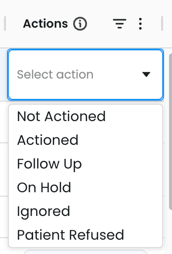
Want to keep track of who you have and haven't contacted? Have multiple team members actioning the same list and don't want to double up? Use our Actions Column!
This column lets you quickly track actions for each row within the table.

Patient Contacts Feature
The Patient Contacts feature allows Viewers of Cubiko to access patient email addresses and phone numbers directly within any patient list in Cubiko. This optional feature streamlines workflows by providing easy access to essential contact details from within Cubiko, helping practices stay organised and efficient.
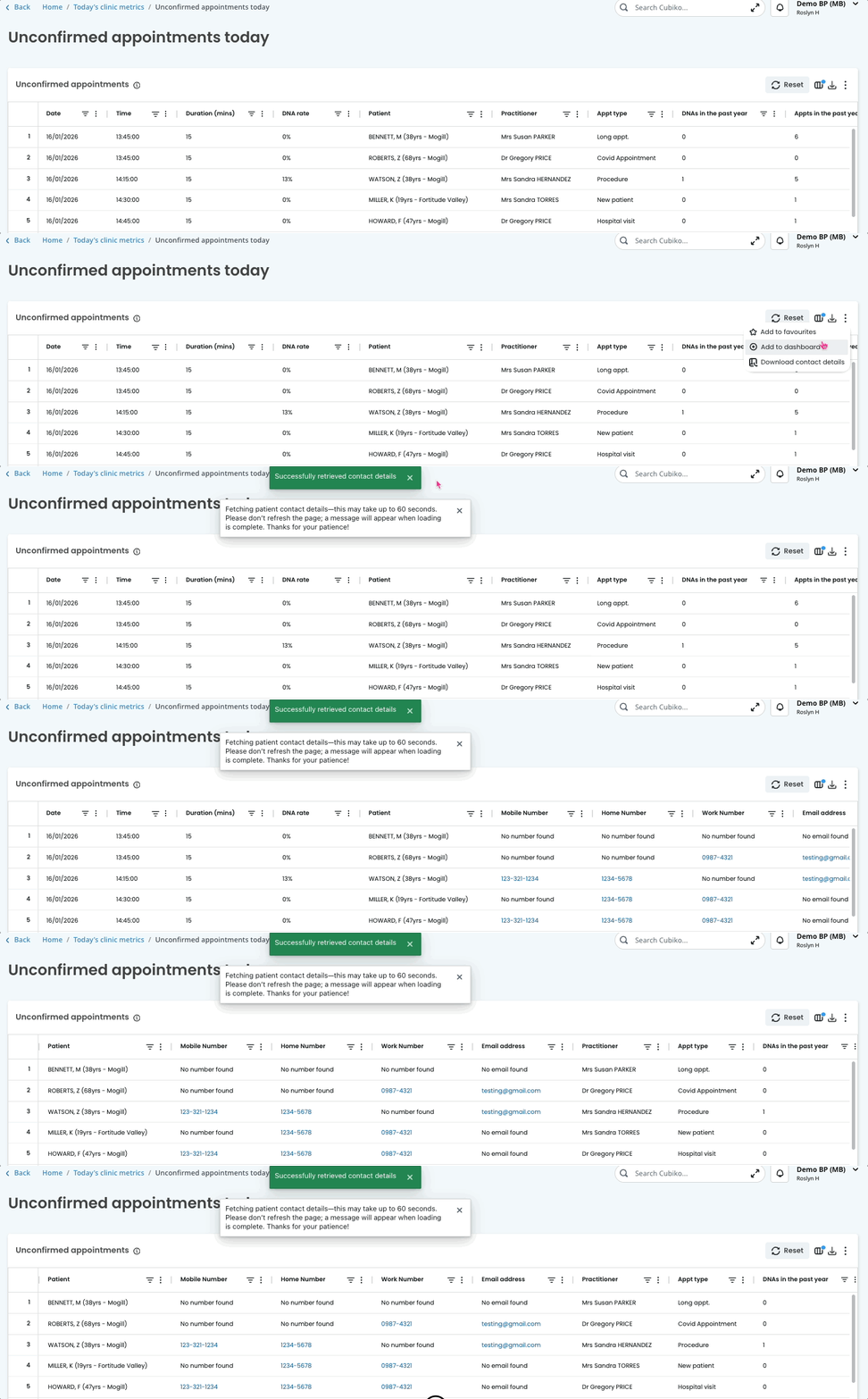
NOTE: Access to this feature must be enabled via Cubiko Settings. If you do not currently have access, speak with your Practice Manager or account administrator to enable.
Links to webinars and resources of interest to your role
- Join us at a LIVE Reception Webinar! Register here.
- Cubiko for Reception online course
- Care Prompts: Send key care opportunities to your Best Practice appointment book
- QuickCheck - how to use
- How to navigate around Cubiko
- How to set up your My Dashboards