
To navigate to this cabinet, go to Clinic Insights tab > Past Clinic Metrics > Diaries Tab > Did not attend rate
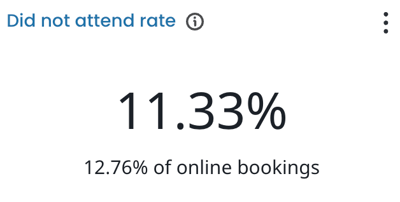
The key areas covered in this article are:
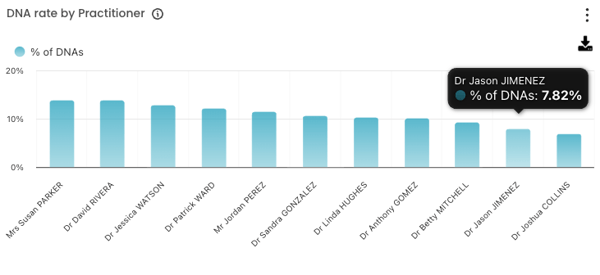
DNA Rate by Practitioner
This figure shows the percentage of missed appointments per practitioner during the selected period. Hover over each column to see the DNA percentage.
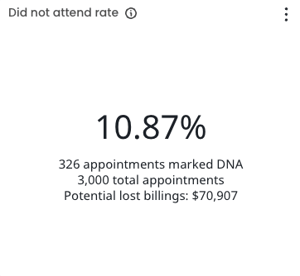
Did not attend rate
This figure tells you what percentage of appointments in the selected period were no-shows. Here's how each component is counted:
-
Total appointments any appointment your PMS marks as completed, paid, invoiced, in progress, or DNA (booked appointments aren't counted).
-
DNA appointments only appointments explicitly marked as DNA.
By default, this metric covers all users and appointment types. Use the sidebar filters to narrow it down.
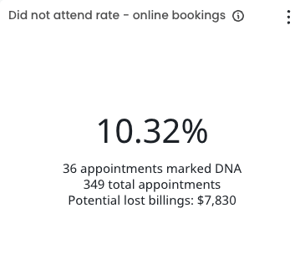
Did not attend rate - Online bookings
This figure tells you what percentage of online-booked appointments in the selected period were no-shows. Here's how each component is counted.
TOPTIP! Track your DNA rate against your practice threshold, spot what needs fixing, and record your progress in our QI: DNA rate activity
For more information you can also visit Quality Improvement Cabinet - Knowledge based article
Did not attend rate by appointment date
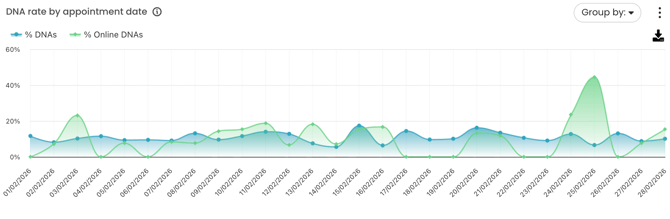
This trend chart shows how your patient did not attend rate has changed day by day within the selected period. It also lets you compare online did not attend rate versus the overall did not attend rate.
- % DNAs — the overall DNA rate across all appointments.
- % Online DNAs — the DNA rate for appointments booked online.
Use this to identify spikes or patterns over time, and to see whether your online booking did not attend rate is tracking differently to your overall did not attend rate.
Did not attend rate by appointment type
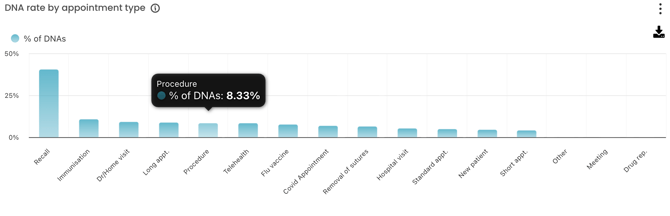
This figure shows the percentage of appointments that did not attend, broken down by appointment type for the selected period.
Use this to identify which appointment types are most affected by non-attendance and where a targeted follow-up or reminder strategy might have the most impact.
Patients with DNA's
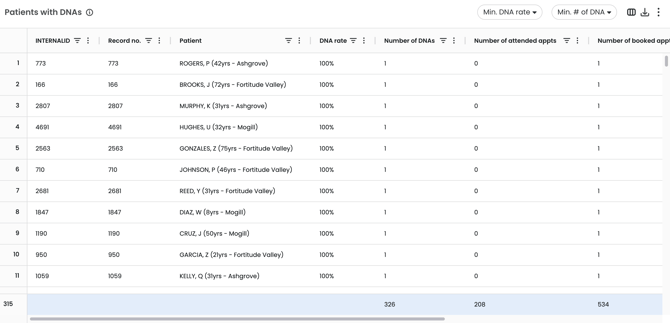
This table gives you a patient-level view of no-shows for the selected period, including each patient's did not attend rate, number of missed and attended appointments, and upcoming bookings. Use the filters at the top to focus on patients with a high DNA rate or a high number of missed appointments then use that list to prioritise your follow-up outreach.
Available filters:
-
Date range
-
Role
-
Practitioner
-
Appointment type
-
Exclude COVID-19 and flu vaccine appointments
-
Hours (Session type by colour)
Managing Patient DNA's: A Step-by-Step Guide
No-shows cost your practice time and revenue, and can impact patient health outcomes. This guide outlines a tiered approach to managing and reducing them.
|
Tier 1 — Immediate Response For all DNA's, on the day they occur
|
1. Acknowledge the missed appointment Send the patient a brief, friendly message (SMS or email) acknowledging the missed appointment and inviting them to rebook. 2. Follow up if they don't rebook If the patient hasn't rebooked within 48 hours, follow up with a phone call. For clinically urgent appointments, make this call the same day. |
|
Tier 2 — Ongoing Monitoring For patients showing a pattern of non-attendance
|
3. Identify repeat DNA's Regularly review your patient list of DNA's and flag patients with a high DNA rate or multiple missed appointments. For example, 3 or more DNAs or a rate above 50%. 4. Strengthen your reminder strategy Increase the reminder frequency for flagged patients. Example SMS 72 hours before, another 24 hours before, and a confirmation request on the day. |
|
Tier 3 — Escalation Measures For patients who continue to no-show despite reminders
|
5. Introduce a DNA fee Consider implementing a DNA fee for frequent DNA's. Communicate the policy clearly at the time of booking. 6. Restrict online booking Use your online booking software to restrict repeat offenders from booking online, directing them to reception instead. This allows staff to reinforce your DNA policy and request confirmation before securing the appointment. 7. Escalate to the treating practitioner If a patient repeatedly misses clinically important appointments, escalate to their practitioner for a more direct conversation about the importance of attendance. |