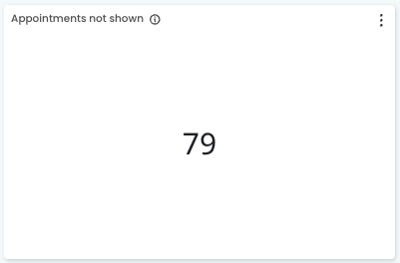
This metric shows the total number of appointments completed/invoiced/paid over a selected time period that are not currently shown in Cubiko reports. This is due to the appointment type not being marked for inclusion in metrics.
Practices have control over the appointments marked for inclusion in metrics, and can complete this in Settings > Appointments. Refer to Completing Cubiko settings for the steps to update an appointment type's inclusion status.
This metric can be found under:
Clinic Insights > Past clinic metrics > Diaries tab > Appointments not shown
This metric is available to our Best Practice Software and MedicalDirector integration customers.
After clicking on the metric, the appointment count is then presented by:
- Total number of Appointments not shown
- Appointments not shown by appointment type
- List of appointments not shown
These can then be filtered down further by:
- Date (defaulting to the last full calendar month)
- Role
- Practitioner (can select individual or multiple)
- Role in PMS
- Ability to Show all users (on by default)
The sections included in this article are:
- Understanding the metric
- Key components and using the metric to ensure your data is correctly showing what you would like to view.
Understanding the metrics
This metric is specifically designed to identify appointment types used at your practice that are not currently showing in your reports.
- Appointment type is not marked for inclusion in metrics (in Cubiko settings)
- Appointment type has only been used by a practitioner who is not marked for inclusion in metrics.
Why would an appointment type not show?
There are a few reasons the appointment type may not appear.
The main reason is that the appointment itself is not marked for inclusion in metrics.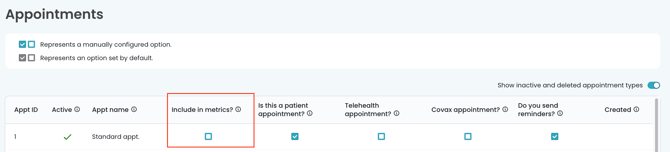
Appointments may also be in "Inactive and deleted appointments" but used by an external provider (e.g. 3rd party booking providers will often use "internet" as the appointment type, but the appointment is not active in your PMS).

Key components and using the metric to ensure your data is correctly showing what you would like to view.
This metric is useful to review regularly to ensure your data and included appointments reflect how you work in your practice.
Customise which appointment types are included in Cubiko metrics by adjusting appointment settings.
Steps to review:
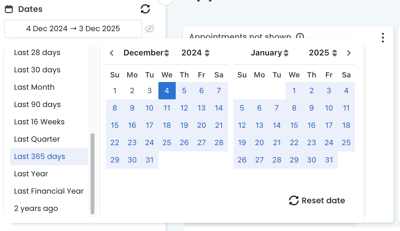
1. Use your date filters to review the last 365 days (or beyond) to see any appointment type not currently shown.
2. Review the Appointments not shown by appointment type chart to see appointments used but not shown in Cubiko.
TOP TIP: If you have quite a few appointment types to review, remember you can export the chart to CSV, which will give you the data in a simple table format:
3. Review and update (if suitable) your appointments in Settings > Appointments.
NOTE: If you have inactivated or removed an appointment type from your PMS (e.g. GPMP appointment types after GPMP was replaced by GPCCMP), it will move to the Inactive and deleted appointment types and default to not being included in metrics.

Refer to Completing Cubiko settings for the steps to update an appointment type's inclusion status.
IMPORTANT: If you change the status of the appointment to be included in metrics, this will impact historical reports that will now show these appointment types if they have been used in the past.
Similarly, if you have inactivated an appointment type in your PMS, it will default to not being included in metrics, and will potentially impact historical reports already completed.
NOTE: Any changes made in Settings → Metrics (including Appointments) will display in your Cubiko dashboards after the overnight update.