
Compatibility note:
- Touchstone is available for Best Practice and MedicalDirector software integration customers only.
- Diary and benchmarking metrics are not available for MedicalDirector practices due to differences in how data is calculated - these metrics won't appear for MedicalDirector users.
- Not currently available for ZedMed customers.
Unlock your practice's full potential with Touchstone - our de-identified, aggregated dataset for industry benchmarking.
To navigate to Touchstone, go to Benchmarking tab > Touchstone

The sections included in this article relating to Touchstone are:
- Touchstone navigation
- Billings
- Billings breakdown
- Bulk billed items
- Diary
- Hours
- New patients
- MyMedicare
- Watch Chris and Amanda discuss Touchstone in our Coffee & Cake Webinar
Touchstone navigation
When you open the Touchstone cabinet, a tab menu at the top of the screen shows all available sections. Click any tab to navigate to that section.

When you first opt in to Touchstone, you'll be asked a few questions about your practice. These help categorise your de-identified data into the right cohort for benchmarking - this is what "cohort" refers to throughout the cabinet.
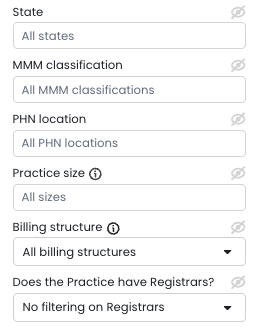
Use the filters in the sidebar to refine your cohort. Filters include:
- State
- Modified Monash Model (MMM) classification
- Primary Health Network (PHN) location
- Practice size (full-time equivalent doctors / FTE)
- Billing structures
- Teaching practice status
- BBPIP participation (optional)
Updates to how we classify bulk billing practices
We've improved how Touchstone categorises bulk billing practices to reflect the introduction of the Bulk Billing Practice Incentive Program (BBPIP) and provide more accurate benchmarking. Previously, we relied on practices to self-report whether they predominantly bulk billed or not during the opt-in process.
From 1st November 2025 onwards, Touchstone automatically classifies practices as bulk billing if they bulk bill over 98% of GP non-referred attendance (GP NRA) items to all Medicare-eligible patients. This new classification is aligned with the BBPIP definition of a bulk billing practice.
Before the introduction of the BBPIP, Cubiko's annual Touchstone Report classified practices as bulk billing if they bulk billed over 80% of all MBS items to all patients.
This data-driven approach means practices may move between categories as their billing patterns change, giving you more accurate cohort comparisons that reflect real-world practice behaviour.
Can't see the Touchstone cabinet? Make sure you've opted in. If you can't see the opt-in option, you may not have the right permissions - check with your practice owner or practice manager.
More info here: Opt-in to Touchstone
Billings
Cubiko compares your billing data against your selected cohort. Metrics shown are:
- GP billings per hour - GP billings divided by GP consulting hours.
- GP billings per appointment - GP billings divided by GP appointments.

The percentages in the small bubbles show the percentage difference between your practice and the cohort.
Below the practice-level summary, you'll see a breakdown by practitioner plotted against the cohort average line.
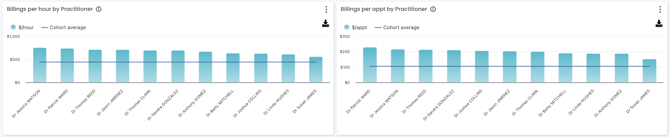
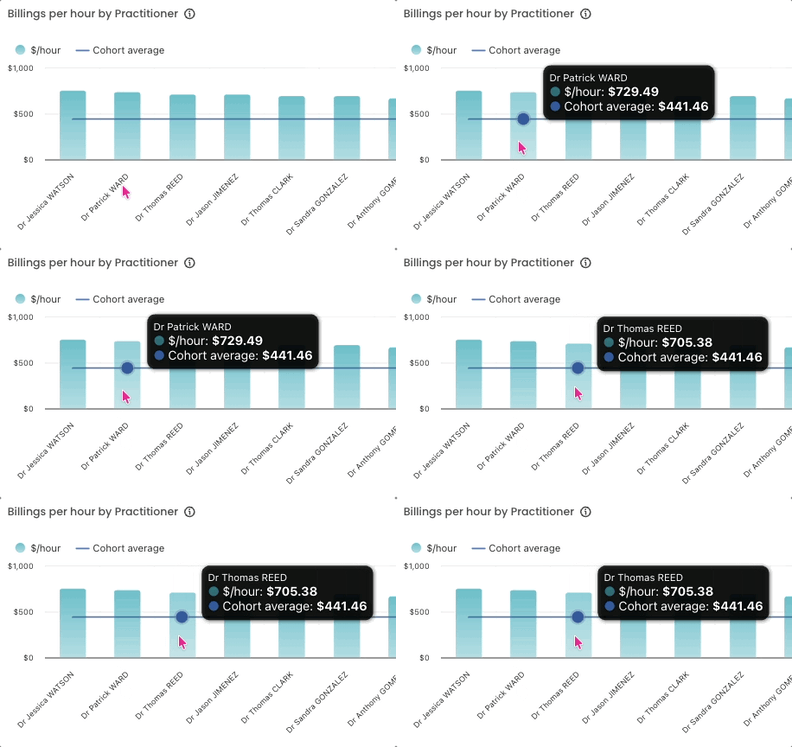
You can hover over each user in the graph for more detailed information as shown below.
TOP TIP! Use the sidebar filters to model how your practice might compare under different scenarios - for example, if you were to change your FTE or billing structures.
Billings breakdown
Cubiko compares your billing breakdown against your selected cohort across the following categories:

- GP CDM and CCMP - includes MBS items 721, 723, 729, 731, 732, 965, 967, 92024, 92025, 92026, 92027, 92028, 92057, 92058, 92068, 92069, 92070, 92071, 92072, 229, 230, 231, 232, 233, 92055, 92056, 92057, 92058, 92059, 92099, 92100, 92101, 92102 and 92103.
- GP Health Assessments - includes items 699, 177, 715, 92004, 92016, 228, 92011, 92023, 701, 703, 705, 707, 224, 225, 226 and 227.
- Nurse-led CDM - includes items 10987, 93200, 93202, 10997, 93201 and 93203.
- Telehealth - includes a broad range of MBS telehealth items. See full item list below or press Ctrl+F to search this page.
- Full list: Items 91790, 91800, 91801, 91802, 92004, 92024, 92025, 92026, 92027, 92028, 92057, 92058, 92142, 91236, 92146, 92147, 92148, 92149, 92170, 92182, 92184, 92112, 92113, 92114, 92115, 92116, 92117, 91818, 91819, 92210, 91818, 91819, 92715, 92718, 92721, 92724, 91792, 91803, 91804, 91805, 91794, 91806, 91807, 91808, 92011, 92055, 92056, 92057, 92058, 92059, 92137, 92150, 92151, 92152, 92153, 92171, 92186, 92188, 91820, 91821, 92118, 92119, 92120, 92121, 92122, 92123, 92211, 92716, 92719, 92722, 92725, 92717, 92720, 92723, 92726, 92746, 92747, 91795, 91809, 91810, 91811, 92016, 92068, 92069, 92070, 92071, 92072, 92145, 92138, 92154, 92155, 92156, 92157, 92176, 92194, 92196, 92124, 92125, 92126, 92127, 92128, 92129, 91942, 91843, 92216, 91890, 91891, 91842, 91843, 92731, 92734, 92737, 92740, 91892, 91893, 92139, 92177, 92198, 92200, 91844, 91845, 92132, 92133, 92732, 92735, 92738, 92741, 92733, 92736, 92739, 92742, 93716, 93717.
The percentages in the small bubbles show the percentage difference between your practice and the filtered cohort.
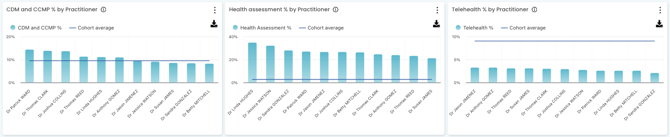
Below the summary, bar charts show each category broken down by practitioner against the cohort average:
- CDM and CCMP % by practitioner - each practitioner's CDM/CCMP billings as a percentage of their total billings, against the cohort average.
- Health assessment % by practitioner - health assessment billings as a percentage of total billings, against the cohort average.
- Telehealth % by practitioner - telehealth billings as a percentage of total billings, against the cohort average.
TOP TIP! To increase CDM billings, our CCM and Item optimisation metrics include suggested workflows you can build into your practice.
More info here:
-
Item Optimisation Overview - for proactive patient engagement
Bulk billed items
Cubiko compares your bulk billing data against your selected cohort. These metrics are further broken down with 4 tabs in this sections:
-
Bulk Billing Practice Incentive Program (BBPIP)
-
Bulk Billings by total amount bulk billed
-
Bulk Billings by items
-
Bulk billings by incentives
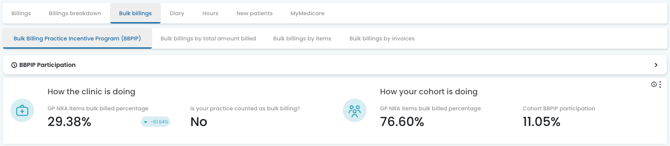
Bulk Billing Practice Incentive Program (BBPIP) This metric shows the proportion of GP NRA services bulk billed to Medicare-eligible patients - the same measure used to determine BBPIP eligibility. Practices billing over 98% on this metric are classified as bulk billing in Touchstone for that month.
Bulk billings by total amount billed Your average and the cohort average of bulk billings as a proportion of total billings (by dollar amount) for GPs.
Bulk billings by items Your average and the cohort average of bulk billings as a proportion of total items billed for GPs, also broken down by concession card holders and patients aged 15 and under. Bulk billings by items is the sum of bulk billed items divided by the total items billed for the selected time period
Bulk billings by invoices Your average and the cohort average of bulk billed invoices as a proportion of total invoices for GPs, also broken down by concession card holders and patients aged 15 and under.
TOP TIP! To understand your private billing opportunity, check out our bulk billing by items metric and our private billing opportunity articles.
Diary
Cubiko compares your diary and appointment data against your selected cohort. Metrics shown are:

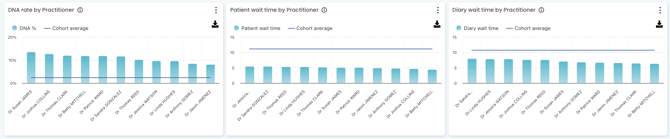
- DNA rate - total DNAs divided by all appointments in the selected period, shown as a percentage.
- Average patient wait time - the time that patients waited before the beginning of their appointment. Patient wait time is the difference between when the patient arrived and when the consultation began. The time the patient spent waiting before the appointment was scheduled to start is not counted.
- Average diary wait time - the delay between the scheduled appointment time and the actual start time, calculated on appointments with a status of Completed, Billed, or Paid. If an appointment starts early, wait time is recorded as zero. If a patient is late, that appointment is excluded from the average.
Below this, bar charts show each metric by practitioner against the cohort average (straight line).
TOP TIP! Practitioners can view their own wait time data in their My Cubiko dashboard. Click here for more information on setting that up.
Hours
Cubiko compares your consulting hours data against your selected cohort. Metrics shown are:

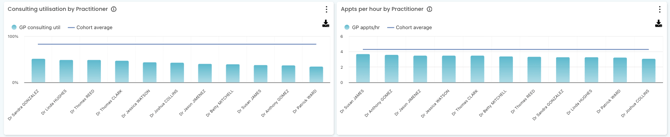
- GP consulting usage - the proportion of available time spent consulting patients (looking retrospectively at time spent in patient appointments as configured in your Settings).
- GP appointments per hour - total completed appointments divided by consulting hours for practitioners with the Doctor role in Settings.
Below this, bar charts show each metric by practitioner against the cohort average.
New Patients
Cubiko compares your new patient data against your selected cohort. Metrics shown are:

- New patients seen by GP (%) - the number of new patients whose first appointment was with a GP (excludes Allied Health/Specialist roles), divided by all new patients.
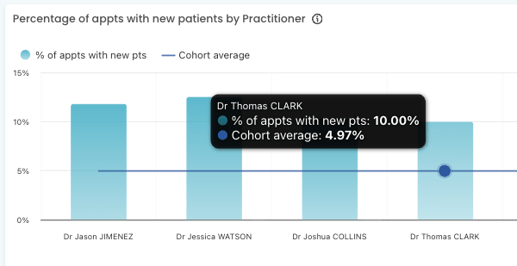
- Appointments with new patients (%) - total new patient appointments divided by total appointments for the selected period.
Below this, a bar chart shows the percentage of appointments with new patients by practitioner against the cohort average.
TOP TIP! To see more new patient metrics - including retention rate and online vs conventional bookings - use the Search function and search "new patients".
NOTE: When using the filters, you may see the message "Not enough practices in query" - this means there aren't enough practices in that demographic in the dataset yet, so no results will be shown. The Touchstone dataset grows as more practices opt in.
MyMedicare
Cubiko compares your MyMedicare registration data against your selected cohort across four areas:
- Overall registrations - your total MyMedicare registered patients, eligible patients, and registration rate compared to the cohort.
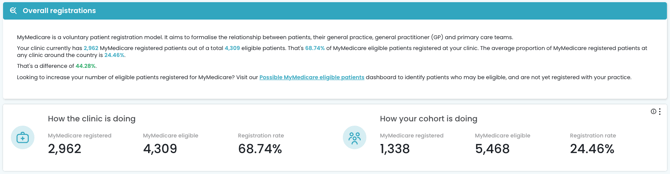
-
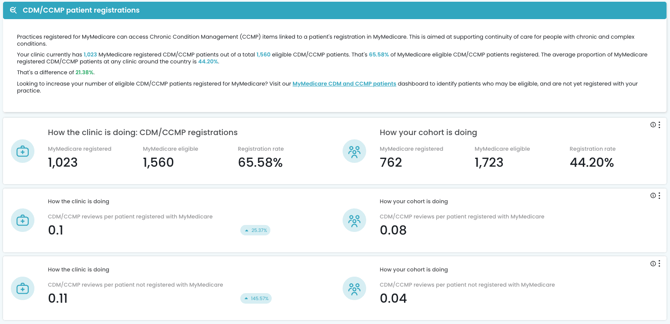
CDM/CCMP patient registrations - how your practice is tracking on MyMedicare registrations for patients with chronic and complex conditions, including CDM/CCMP reviews per registered and unregistered patient compared to the cohort.
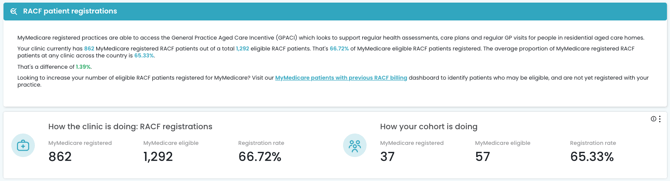
- RACF patient registrations - MyMedicare registrations for patients in residential aged care, compared to the cohort.
-
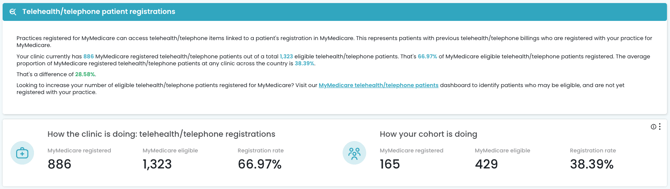
Telehealth/telephone patient registrations - MyMedicare registrations for patients with previous telehealth or telephone billings, compared to the cohort.
TOP TIP! Each section links through to a dedicated dashboard to help you identify eligible patients who aren't registered yet - a quick way to grow your registrations and capture available incentives.
Visit the MyMedicare - Eligible patients with an appointment today to capture these registrations when the patients check-in for their appointment.
Watch Chris and Amanda discuss Touchstone in our Coffee & Cake Webinar
Watch our 30 minute Coffee & Cake with Cubiko webinar on Touchstone.
TOP TIP! To opt-in to Touchstone, please see our knowledge base article!