
My Cubiko gives each Practitioner their own view of their service opportunities, reminders, billings, diary and patients, so Doctors can see the information that matters to them without searching through the whole practice's data.
To open it, select My Cubiko in the sidebar on the home page.
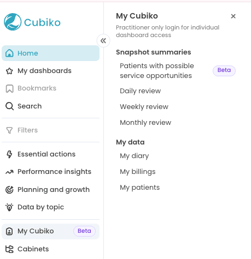
The sections included in this article are:
- Setting up Practitioner access
- Patients with possible service opportunities
- Daily review
- Weekly review
- Monthly review
- My data section
Setting up Practitioner access
My Cubiko is designed for Practitioner logins, so each Doctor sees their own data. To give a Practitioner access, they need to be set up as a Viewer in your Cubiko account.
- Go to Settings > Viewers.
- Click Create new Viewer, or Edit an existing Viewer.
- Link the Viewer to their Practitioner and give them access to My Cubiko.
For step-by-step instructions, see Setting up access for Practitioners and Doctors to My Cubiko.
Patients with possible service opportunities
Patients with possible service opportunities is the first item under Snapshot summaries heading. It lists patients booked in with the Practitioner who Cubiko has flagged as possibly eligible for MBS services, based on their previous billings at your practice location.
The Upcoming appointments with potential service opportunities table lists each patient and appointment. Turn on Show all patients to widen the list.
Use the Open new window button to pop this out into a list in a window that you can drag and resize and have running next to your practice management software.
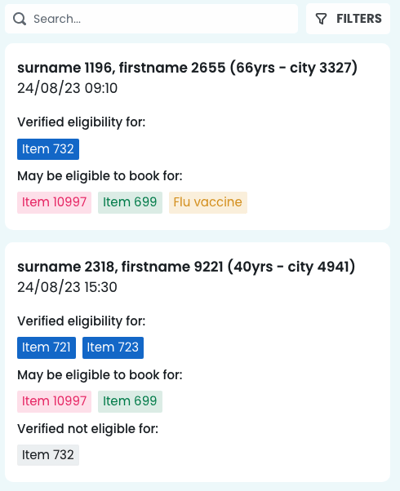
Caution: Eligibility is based on previous billings only. Always use this list as a prompt and make your own billing decisions.
TOP TIP! Doctors can check this list before their session starts, and nurses can use it to prepare for CCMP and health assessment appointments. For more detail, see Zedmed - Possible service opportunities today.
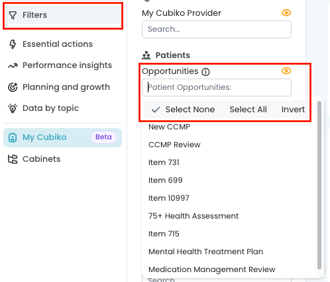
Opportunities Filter
You can use this filter to show only the items you are looking for, such as CCMP or Health Assessments. The list will update automatically once the filter is applied.
Daily review
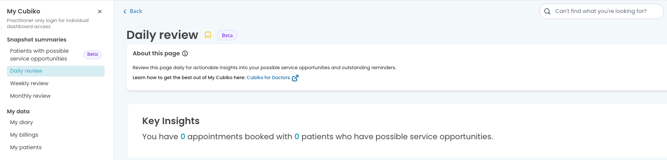
The Daily review gives the Practitioner actionable insights into their possible service opportunities and outstanding reminders for the day. It includes:
- My outstanding reminders
- My service opportunities
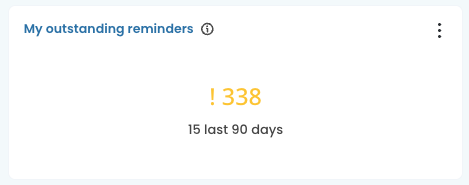
My outstanding reminders
Click My outstanding reminders to see the full list of outstanding reminders the Practitioner has requested, including the patient, reminder type, created date and due date.
My service opportunities
Click on these services to take you to the Patients with possible service opportunities list.
Weekly review
The Weekly review helps the Practitioner monitor key billing reports and actionable items from the past 7 days. Key Insights at the top summarises completed appointments and the uncompleted appointment rate.
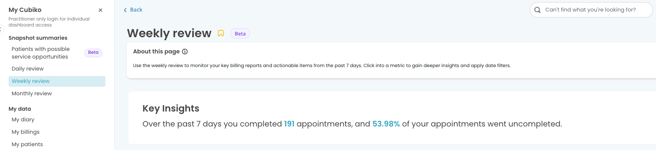
There are 2 sections on this page:
-
My billings and optimisation
- My diary and patients
Viewing more detail
Click any metric name shown in blue to open its full page to see the full list of information for this metric, including the patients, services, appointments, and trends/graphs. Click Back to return to the review.
Monthly review
The Monthly review helps the Practitioner monitor important billing and patient indicators over the past month. Use the date filter to change the date range.
There are 2 sections on this page:
-
Billing and optimisation
- My diary and patients
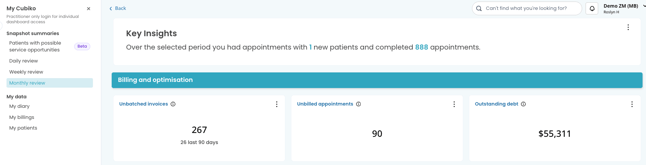
As with the Weekly review, click any metric name in blue to see more detail.
TOP TIP! Doctors can use Unbilled appointments in their monthly check-in to catch completed appointments that haven't been billed yet. See Zedmed - Unbilled appointments.
My data section
The My data pages show similar metrics to the reviews, grouped by topic instead of time period. Each page has Key Insights at the top and a date filter to change the date range. Click any metric name in blue for more detail for that Practitioner.
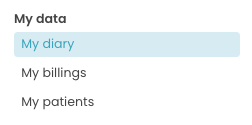
My diary
My diary shows insights into the Practitioner's diary, utilisation and appointments, including their next available appointment. It has two sections:
- Diary and appointments
- Utilisation and hours
TOP TIP! Practice managers and Doctors can use Rebooking rate together to see how well follow-up appointments are being booked. See Zedmed - Rebooking Rate.
My billings
My billings shows insights into the Practitioner's key billing reports and operations. It has two sections:
- Billing reports
- Operations
TOP TIP! Use the filters to search for specific items, appointments, or groupings.
My patients
My patients shows insights into the Practitioner's new patients and outstanding reminders. It has two sections:
- My new patients
- Reminders
NOTE: New patients represents the number of patients who attended their first appointment in the selected period applied in your filters. More information on New Patients here.
To learn more about how Doctors can get the most out of My Cubiko, see Cubiko for Practitioners and Doctors - My Cubiko.
Note: The Zedmed metrics in this cabinet may differ from other PMS software.