
This AI medical transcription tool runs quietly in the background during patient consultations, automatically generating clinical notes. This allows you to focus on patient care, not paperwork.
To learn more about Lyrebird, click here: Lyrebird Health
To navigate to this cabinet, go to Integrations > Lyrebird
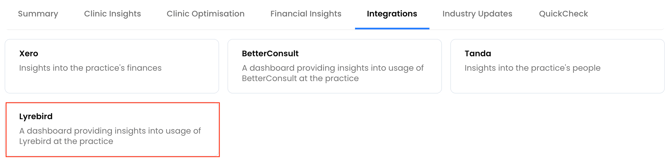
There are two sections you can review with integrating Lyrebird with Cubiko:
- Track Lyrebird usage within your practice
- Lyrebird comparison over the past 12 months
- Lyrebird usage table breakdown
- Lyrebird in your Practice
Track Lyrebird usage
The first two metrics you see will help you track Lyrebird usage.
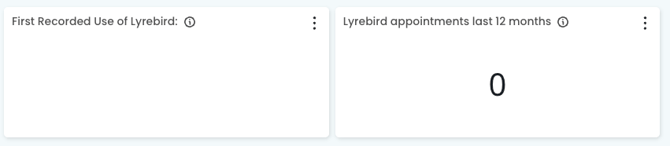
First Recorded use of Lyrebird: This metric shows the earliest date at which usage of Lyrebird was recorded by any practitioner at the practice.
Lyrebird appointments in last 12 months: This metric shows the number of appointments with recorded Lyrebird usage over the past 12 months.
TOP TIP! Are you utilising the benefits of Lyrebird? Track the number of appointments with recorded Lyrebird usage over time!
Lyrebird comparison over the past 12 months
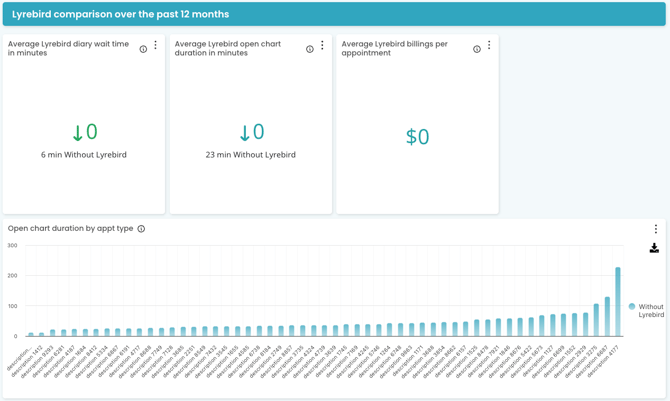
Average Lyrebird diary wait time in minutes: This figure shows the average time elapsed between the scheduled and the actual start time of appointments with recorded Lyrebird usage over the past 12 months.
Average Lyrebird open chart duration in minutes: This figure shows the average open chart duration in minutes with recorded Lyrebird usage over the past 12 months.
Average Lyrebird billings per appointment: This metric shows the average billings per appointment with recorded Lyrebird usage over the past 12 months.
Open chat duration by appt type: This figure represents the average open chart duration by appointment type with vs. without Lyrebird by appointment type. A patient must have a completed/invoiced/paid appointment with a user and appointment type that are marked to be included in Cubiko Metrics.
TOP TIP! Track the utilisation of Lyrebird's opportunity suggestion via billings per appointment. Are Practitioners seizing more opportunities during the appointments that they use Lyrebird?
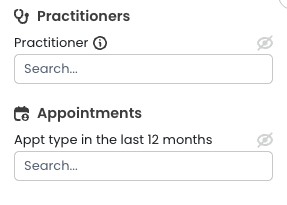
Feel free to filter by individual Practitioner or appointment type via the filters on the left-hand side!
Lyrebird usage table breakdown
Use this information to see how frequently Lyrebird was used across the practice group over the last 12 months. The table will provide you with insights on how Lyrebird is used for each appointment type in your PMS:
Practitioner: Easily filter the data to focus on individual practitioners, allowing you to review Lyrebird usage, appointment trends, and performance for each provider within your practice group.
Appointment type: As with other reports, you can use filters to focus on specific appointment types. This enables you to drill down into Lyrebird usage patterns for consultations such as standard, long, or Telehealth appointments, helping you identify where Lyrebird delivers the most value across your practice’s services.
Lyrebird usage %: This figure shows the percentage of completed appointments where Lyrebird was used for a specific provider and appointment type.
Reviewing this figure helps you understand the adoption of Lyrebird across different appointment categories (e.g., standard, long, or Telehealth appointments) and enables you to quickly spot trends, identify areas for improved utilisation, and ensure your team is maximising the efficiency and clinical benefits that Lyrebird offers during patient consultations.
Appointments where Lyrebird was used: For each provider and appointment type, this figure represents the total number of consultations in which Lyrebird was actively used to generate clinical notes during the appointment.
Monitoring this number helps you assess the adoption of Lyrebird across different practitioners and appointment categories, allowing you to identify utilisation patterns, support best practice workflows, and ensure your team is leveraging Lyrebird’s features to enhance efficiency, accuracy, and patient care during consults.
Completed appointments: This represents the total number of appointments that have been fully completed for each provider and appointment type. It includes all appointments that were finalised in your PMS, providing a clear overview of practitioner activity and patient flow.
Monitoring completed appointments allows you to track overall practice engagement, identify trends in appointment types, and better understand how Lyrebird-supported consults contribute to the delivery of care across your practice.
TOP TIP! Use the Uncompleted Appointments metric to ensure your Cubiko data is clean and up-to-date so that the reporting on this metric is most accurate.
Lyrebird in your practice
Care Prompts:
Send key care opportunities to your Best Practice appointment book, via Care Prompt feature, which will automatically surface in Lyrebird - helping you seize every opportunity for proactive, guideline-aligned care!
Practice Managers and/or administrative teams can send Care Prompts, which will embed into Lyrebird consults, for your Practitioners to easily review any patient opportunities.
Maximise care opportunities, including helping Practitioners identify potential MBs items, including care plans and health assessments - Check out our Care Prompts.
QuickCheck:
Cubiko QuickCheck is an add-on feature for existing Cubiko customers. It enables practices to directly confirm patient item eligibility with Medicare for Chronic Condition Management Plans (CCMP) and Mental Health Treatment Plans (MHTP).
Streamlined workflows to maximise billings and patient care - Simply run QuickCheck, then send care prompts for verified data to display in Lyrebird!
Not subscribed to QuickCheck - learn how to get started!
Already subscribed? - Amazing, check out how to use!