
Some metrics in this article are only available to our Best Practice software integration customers.
The Item Optimisation cabinet looks at your whole database of patients with a potential service opportunity, including those with an appointment and those without a future appointment.
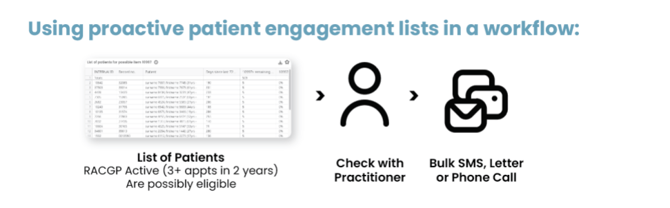
Use the cabinet to identify a list of patients potentially eligible for specific services. Review the list with the patient's practitioner and proactively contact these patients to schedule appointments for the services to be completed.
Practice managers, Receptionist and Nurses can use this cabinet weekly to:
- Identify the service opportunities items you would like to extract patient lists for
- Export your list to discuss with the relevant Practitioner
- Contact the patients to schedule an appointment
To navigate to this metric, go to Clinic Optimisation tab > Item Optimisation

The sections included in this article are:
- Understanding the Item Optimisation metrics and data
- Chronic Condition Management (CCMPs and Reviews)
- Health Assessments
- Other Potential Opportunities. - Using the summary page
- Key components and filters
- Using the metric and data in your practice
- Additional resources
Understanding the Item Optimisation metrics and data
Within this cabinet, you will find a metric for each below item. These are broken into key areas. Click through to each metric to filter and see your full potentially eligible patient list.
Eligibility is based on patient demographics and previous billings of face-to-face, telehealth, telephone and non-VR item numbers at your practice.
The cabinet includes two tabs:
-
Item Opportunities – Displays individual service metrics (e.g. CCMPs, Health Assessments, Nurse items).
-
Summary – Displays a consolidated patient list showing all potential service opportunities for each patient in one view.
1. Chronic Condition Management (CCMPs and reviews)
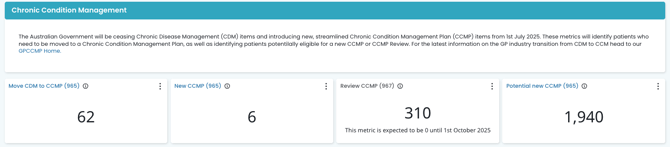
- Item 965 Preparation of a Chronic Condition Management Plan (CCMP):
Eligibility is based on historical billings at your practice.This excludes patients who have had an item 721 (GPMP) or 965 (CCMP) in the last 12 months and those who have had an item 732 or 967 (CCMP Review) or equivalent in the last 3 months.
- Item 967 Review of a CCMP:
Eligibility is based on historical billing at your practice. Looking at whether a patient has been billed an item 965 at the practice in the past 18 months or an item 967 in the past 18 months, and either of those items was billed more than three months ago. This list excludes patients who have had an item 967 in the past 3 months, and patients who are coming up to being due for their next review.
- Potential patients for new item 965 (CCMP)*: Eligibility is based on patients with an underlying condition (listed in the patients' active past history and observations) who have either never had a care plan (GPMP, TCA or CCMP) or have not been billed for a care plan/review in the last two years.
Broadly, our search function looks at Blood cancer diagnosis (within the last 5 years), Bone marrow transplants (within the last 2 years), Chronic liver disease, Chronic renal failure, Coronary heart disease or failure, Diabetes, Haemoglobinopathies, High BMI, Neurological condition, has a transplant and immunosuppressant and Non-haematological cancer diagnosed in the last year. -
Move CDM to CCMP (965): All patients on existing Care Plans will need to be transitioned over to a new CCM plan (965) after July 1st 2025, in order to continue to move forward with future Care Plan reviews (967). Eligibility is based on historical billings at your practice. This metric is showing patients who have had a CDM plan billed (721, 723) in the last 2 years, and excludes those patients who had any CDM billing (721, 723, 732) in the last 3 months.
EXAMPLES:
- Mary had a 721 and 723 billed more than 12 months ago and has not received any reviews since that initial plan. She will be on the Item 965 Preparation of a Chronic Condition Management Plan (CCMP) list.
- Patrick received a new 965 on July 1st 2025. He is due for a review in October. He will show on the Item 967 Review of a CCMP list from October.
- Steve has been attending the practice and has been identified as having an underlying health condition, which means he is now potentially eligible for a care plan. He has not had a CCM or CDM billing in the last 2 years. He will show on the Potential patients for the new item 965 (CCMP) list.
- John had a 721 and 723 billed on 1st May 2025. He was due for a review after 1st August 2025. Since the CCM changes, John will now be on the list for Move CDM to CCMP. He will require a new CCM billing in order to continue his care plan.
- Jane had a 721 and a 723 billed in 2023. She has been receiving reviews (732) since this time. After June 1st 2025, she will now need to be billed a new CCM item. Jane will be on the Move CDM to CCMP list.
Review the full Chronic Disease Management workflow here.
2. Health Assessments
Review the full Health assessment workflow here.
There are four time-based MBS health assessment items: 701 (brief), 703 (standard), 705 (long) and 707 (prolonged). The following categories of health assessments may be undertaken by a medical practitioner (other than a specialist or consultant physician) under these items:
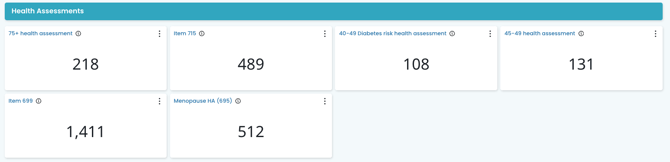
- 75 + Health Assessment: This metric shows the number of 75+ patients who have not had a 75+ Health Assessment billed at your practice in the last 12 months. Over 75 health assessments can be performed every 12 months, so make it an annual re-occurring appointment for your patients. It can be a great idea to coincide the health assessment appointment with the patient's birthday as an easy reminder!
- 40-49 Diabetes Risk Health Assessment : This metric shows the number of patients who may be eligible for a 40-49 Diabetes Health Assessment. Patients are eligible if they have had an AUSDRISK assessment in the past 3 months and were scored in a high-risk range (12+) and are between the ages of 40-49 (inclusive) or 15-54 (inclusive) for Aboriginal and Torres Strait Islander people. Patients who have had a 40-49 Diabetes Health Assessment in the past 3 years are excluded from this list.
- 45-49 Health Assessment: This metric shows the number of patients who may be eligible for a 45-49 Health Assessment and have not had a Health Assessment billed since they turned 45. A patient is eligible for a 45-49 health assessment if they have a risk factor that puts them at risk of developing a chronic disease. This will exclude patients who have been on a GPMP, TCA or CCMP in the past.
Risk factors may include, but are not limited to:
- lifestyle risk factors, such as smoking, physical inactivity, poor nutrition or alcohol use;
- biomedical risk factors, such as high cholesterol, high blood pressure, impaired glucose metabolism or excess weight; and
- a family history of chronic disease.
Cubiko looks at these risk factors from the patient file in Best Practice to identify patients who may be eligible for a 45-49 years Health Assessment.
- Item 715: This metric shows the number of Aboriginal or Torres Strait Islander patients who have not had a 715 Health Assessment in the last 9 months.
Medical practitioners providing a health assessment for Aboriginal and Torres Strait Islander people should use MBS Item 715. This MBS health assessment item has no designated time or complexity requirements.
-
Heart health assessment item 699: This metric shows the number of patients eligible for item 699 who have not had any Health Assessments in the past 12 months.
- Menopause and perimenopause health assessment item 695: This metric shows the number of patients who may be eligible for item 695 based on the following criteria:
- Their patient record is active
- Patient's birth sex is female
- Has not been billed an item 695 in the past 12 months
- Is experiencing premature ovarian insufficiency, menopause, early menopause, perimenopause, menorrhagia, post menopausal bleeding, oligomenorrhoea, dysmenorrhoea (primary or secondary), amenorrhoea (primary, secondary or post pill), menstrual irregularity, flushing, ovarian failure (primary and secondary), dysfunctional uterine bleeding, menopause hormone therapy, surgical menopause, oophorectomy, salpingo-oophorectomy, salpingo-oophorectom- laparoscopic, abdominal hysterectomy with bilateral salpingo-oophorectomy and oestrogen replacement therapy.
or is undergoing treatment for these symptoms.
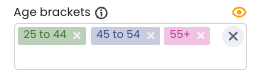
NOTE: You can use this filter and adjust the age group being included in the metrics. By default, it is showing patients between 25yo - 55+.
Review the full Menopause and perimenopause health assessment guide here
3. Other potential eligibilities
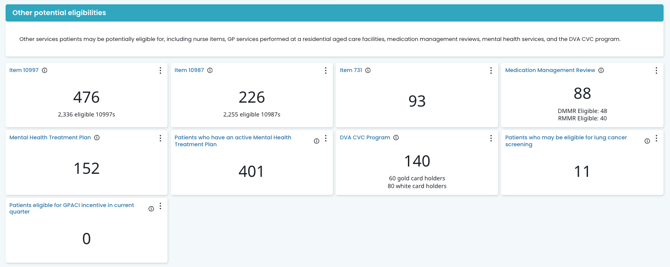
Nurse Items 10997 + 10987
- Item 10997 Provision of monitoring and support for a person with a chronic condition by a practice nurse or Aboriginal and Torres Strait Islander health practitioner: Eligibility is based on the patient's billing history at the practice and has had items 721, 723, 732 billed prior to July 1st, 2025*, or an item 965 or 967 billed in the past 18 months. Eligibility will also include whether the patient has been billed for a multidisciplinary care plan (731) in the last 18 months. This excludes patients who have had 5 or more 10997s this calendar year and those who have been rejected for a 10997 in the calendar year.
- Item 10987 Follow-up service provided by a practice nurse or Aboriginal and Torres Strait Islander health practitioner, on behalf of a Medical Practitioner, for an Indigenous person who has received a health assessment: This metric shows the number of patients who have had an item 715 billed in the past 12 months and have not had 10 x item 10987s the whole calendar year
As with other patient lists in Cubiko, ultimately, it is the Practitioner's decision whether a patient is eligible for a particular type of service.
*NOTE: Eligibility for 10997 will include previous billing of items 721, 723 and 732 until June 30th 2027.
Item 731
Contribution by a general practitioner (not including a specialist or consultant physician) to a multidisciplinary care plan for a resident in RACF or a patient being discharged from a hospital (or a review of such a plan prepared by another provider).
In Cubiko, patients who may be eligible for an item 731 are patients who have previously had an item 731 billed (including Telehealth, Telephone, and non-VR item number equivalents), but not in the past 3 months.
Medication management reviews (MMR's)
Eligibility is identifying patients who have been previously billed an item 900, 903, or equivalent DVA or non-VR item more than 12 months ago (irrespective of current medications) or are currently on 5+ medications.
*Patient eligibility based on 5+ medications is only available for customers on Halo and requires clinical consent.
Review the full Medication management review workflow here.
Mental health treatment plans (MHTP) and Active mental health treatment plans
- Mental Health Care Treatment Plan: Eligibility is based on historical billings at the practice, having had previous MHTP item billings. This excludes patients who have had an MHTP item billed in the past 12 months.
- Active Mental Health Treatment Plan: This list contains patients who have an active mental health care plan in place and have been billed an MHTP within the last 12 months. This list also includes MyMedicare registration status and the reason for the patient's last visit to the practice.
Review the full Mental health treatment plan workflow here
DVA CVC program
Eligibility is identifying DVA Gold and White Card holders who (based on historical billings) may have a chronic disease and have not had a CVC item billed in the past 90 days. Patients are deemed as possibly having a chronic disease if they have previously had a Chronic Disease Management or Chronic Condition Management item billed.
Review the full DVA CVC program workflow here.
Patients who may be eligible for lung cancer screening
Shows a list of patients who may be eligible for lung cancer screening. This number may include patients who have already been screened for or diagnosed with lung cancer. Ex-smokers are not included in this count.
Eligibility for a lung cancer screening includes:
- The patient is aged between 50 and 70 years old
- They are an active smoker or have quit smoking in the last 10 years
- They have a smoking history of at least 30 pack-years
- They show no signs or symptoms suggesting they may have lung cancer
Patient's eligible for GPACI incentive in the current quarter
Provides practices with a clear overview of the care that has been delivered to their (GPACI) patients, including when it was completed, while also highlighting any remaining services that still need to be completed.
- Track information for:
- GPACI incentive requirements for patients in the current quarter.
- GPACI incentive requirements for the current 12-month cycle the patient is in.
- Review the potential GPACI practice incentive available for the current quarter
Review the full General Practice Aged Care Incentive Patients workflow here
Using the Summary Page
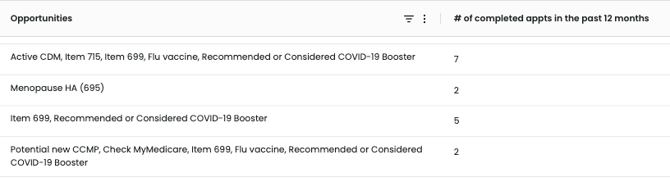
The Summary tab provides a consolidated patient view of all service opportunities identified in the Item Opportunities metrics.
Unlike the Item Opportunities tab, which displays metrics by individual service item, the Summary tab presents a more patient-centred view. Each row represents an individual patient, their details and the various services they're potentially eligible for based on their billing history.
Each row in the Summary table represents an individual patient and displays:
-
Their identifying details
-
All service opportunities identified for that patient
-
Appointment and practitioner information
-
MyMedicare registration status
-
A shared Actions column for tracking follow-up
The Summary tab provides a combined patient list across all service categories.
Power Tip Video: Prefer a quick walkthrough video?
This Power Tip covers practical use cases of the Summary page, including:
-
How to apply filters to narrow your patient list
-
Using the Opportunities filter to focus on a specific service
-
Adjusting and customising table columns (including how to include or remove columns from your view)
When to use the Summary tab
Use the Summary tab when you want to:
-
Identify patients with multiple service opportunities
-
Review all eligible services for booked patients
-
Focus on patients with no appointment scheduled
-
Identify MyMedicare-registered patients alongside their potential service opportunities
-
Coordinate follow-up across your team
Filtering in the Summary tab
The Summary tab uses the same filter panel described in the Key components and filters section above. These filters allow you to refine the patient list by appointment status, practitioner, patient demographics and registration status.
In addition to those filters, the Summary tab includes an Opportunities filter under the Patients section.
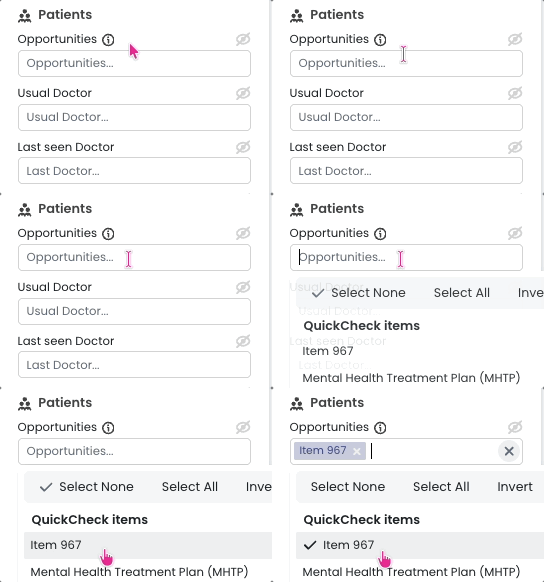
This allows you to narrow the consolidated patient list by a specific service opportunity (for example, CCMP, Health Assessment or Nurse item). This is particularly useful when you want to focus on a single service type within the consolidated patient list.
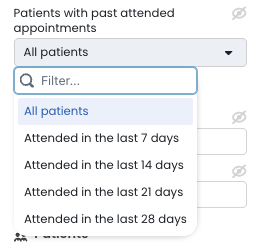
Patients with past attended appointments:
There is also a new filter type to show a list of patients who attended an appointment in the last 28 days. This is particularly valuable if you are reviewing what opportunities were available, that may have been missed during the patient's last visit. Use the Next booked column to see if they have rebooked for one of their eligible services, or use that information to contact the patient to book their next appointment for one of these services.
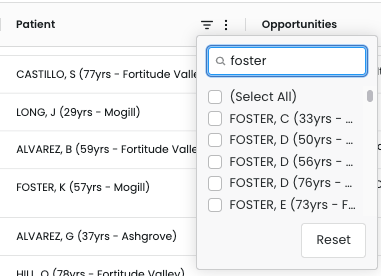
Use the patient name column filter to find a specific patient in the list. This is particularly useful if you have a patient you are seeing or contacting, but would like to see a fuller picture of what else they may be eligible for so that you can best prioritise what service you offer.
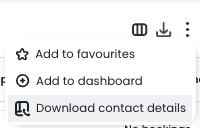
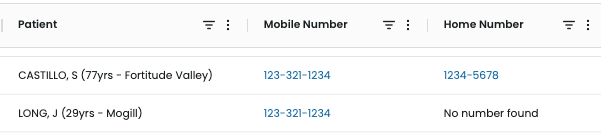
TOP TIP: Use the Patient Contacts feature to add the patient's phone number directly into the Cubiko list, making contacting the patient a more efficient use of your time. More info here: Patient Contacts feature
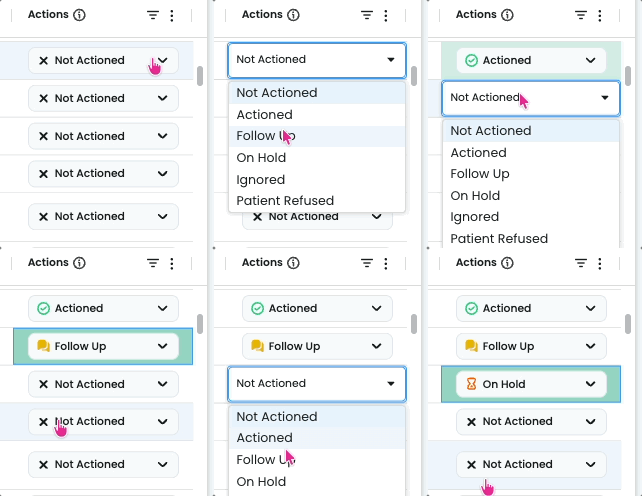
Use the Actions column to record the follow-up status for each patient.
These statuses are shared across all viewers at your practice, helping your team coordinate outreach efficiently, so you can focus your time where it matters most - supporting patient care.
This is particularly helpful when you have multiple team members who are actioning the lists together in Cubiko. It allows everyone to see what the status is for this engagement. By hovering over the action, you can see who last updated the action, so you have a point of contact if you have any questions.
To export the Summary list: Click the Export icon in the top-right of the table (next to Reset).
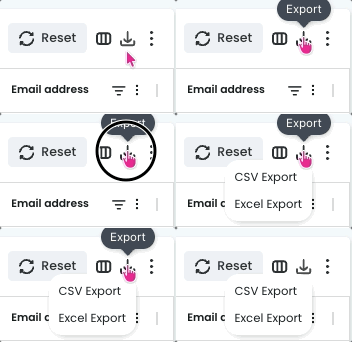
This will download your filtered consolidated patient list for practitioner review, planning sessions, or follow-up campaigns.
As with all Cubiko patient lists, final billing decisions must always be made by the Practitioner.
Key components and filters:
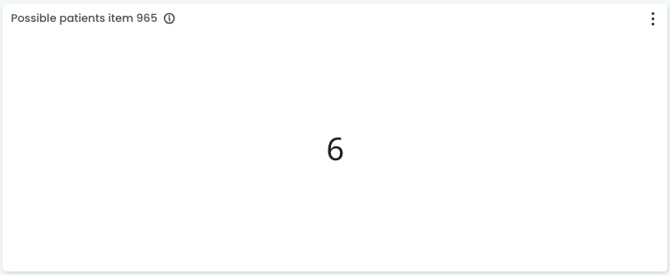
Possible patients
See the number of patients who may be eligible for the service/item number:
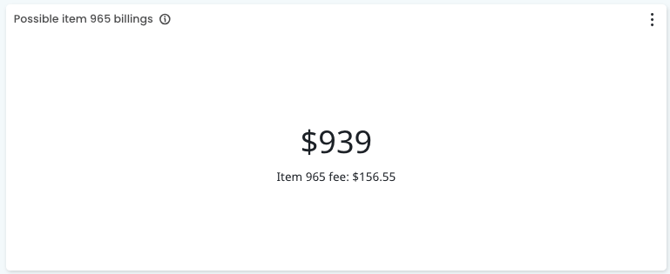
Possible item billings
See the value of billings that could be made from the patients who may be eligible for the item number:
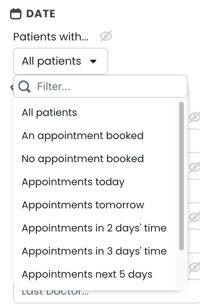
Date
Use this filter to filter lists via all patients, patients with upcoming appointments or No appointment booked! By default, it will show all active patients.
Use the date range on the table to find patients with upcoming eligibility for a CCM Review. 
Select Practitioner
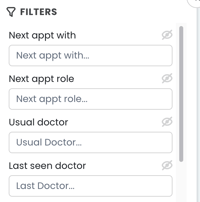
If you are looking at patients with an upcoming appointment, you can select the practitioner to filter via the "Next appt with" section OR if you are looking at patients with No upcoming appointment you can filter via "Usual Doctor" if actively selected in your Practice Management software or Last seen doctor:
Toggles
Use the toggles in the filters to filter down the patient lists further:
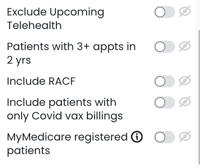
TOP TIP! If you have large lists of potentially eligible patients, use the Patients with 3+ appts in 2 years to focus on your active patient database.
Using the metrics and data in your practice
1. Identify the service opportunities items you would like to extract patient lists for
This cabinet is broken down into categories. 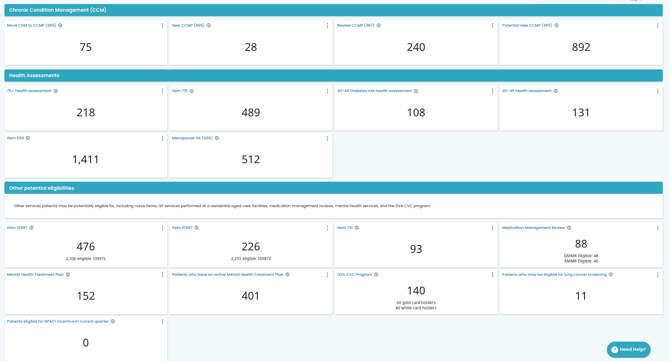
2. Once you have selected the item, click through to filter your patient list
By clicking into an item heading, you will find detailed information on potential patients for each service and a full list of patients: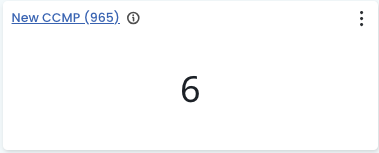
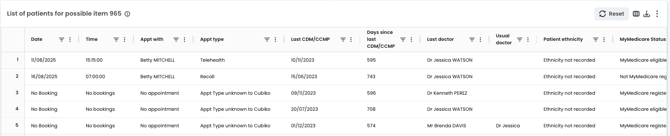
Use your filters to identify patients with upcoming appointments over a period of time OR "No appointment booked"
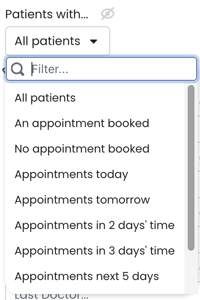
You can then filter the list down via Practitioner:

Change the billing frequency and use the toggles to filter the list to look at:
Active patients with 3+ appointments in 2 years, and choose to include or remove RACF patients, patients under 18 years old, and MyMedicare registered patients.
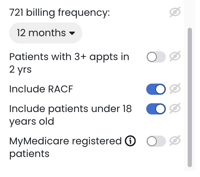
You may also like to toggle on to include patients that have been billed a 965 in the last 12 to 18 months in addition to those that have had a 965 billing prior to 18 months.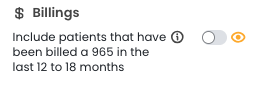
TOP TIP!
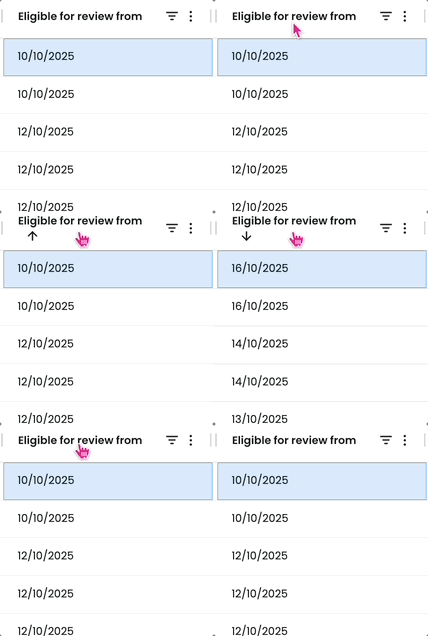
Filter patients eligible for item 965 review up to 4 weeks in advance, using the table customisation! Head to Item 967, scroll down to the second table for some key filtering options!
Use the 'Eligible for review from' column to prioritise and proactively engage with patients.
3. Export your list to discuss with the relevant Practitioner
Once you have applied the relevant filters click the small download arrow on the top right-hand side of the patient list. This will export your filtered list into a CSV format. You can then select your download on your computer and print this list for review with the Practitioner.
4. Contact the patients to schedule an appointment
Be sure to use our forecasting tool below to ensure you have the capacity to book these patients for these services. You may choose to contact patients via:
- Bulk SMS - Our patient lists in Cubiko provide the INTERNAL ID, which can be used by third-party software applications that integrate with Best Practice, to enable sending of SMS to these patients (such as Automed and HotDoc). For more information on how to download a .CSV file from Cubiko, click here.
- Letter
- Phone call
TOP TIP: Use our Patient Contacts feature to see the patient's phone number and email within the Cubiko lists
Incorporate this as a daily task into your team workflows
- Review the Service opportunities workflows for each category (for example Chronic Condition Management)
- Review the workflow templates for your team here!
Additional resources:
- More information about 715 health assessments can be found on the Department of Health and Aged Care website here.
- Use this link to The Australian Type 2 Diabetes Risk Assessment Tool (AUSDRISK) to estimate a patient's risk of getting type 2 diabetes in the next 5 years for your 40-49-year-old diabetes health assessment.
- The Heart Foundation has created a Toolkit for General Practice to help integrate Heart Health Checks (item 699) into routine patient care. You can access this Toolkit here.
- More information about the DVA CVC Progam and how to implement this in your practice can be found on the DVA website here.