
This article covers how guarantees are configured for a practitioner and how the guarantee calculation works, including the difference between the pre-GST and post-GST methods.
The sections in this article include:- Where to configure a disbursement guarantee
- Setting the guarantee periodicity
- Setting a guarantee end date
- How the guarantee is calculated
- Pre-GST and post-GST calculation
- Viewing the guarantee in a fee run
Where to configure a disbursement guarantee
A disbursement guarantee is an agreement between the practice (or billing entity) and an individual practitioner, so it’s configured on the practitioner rather than across the whole practice.
1. Navigate to Calculate > Practitioners tab > Calculate Practitioners.
2. Select View on the relevant practitioner.
3. On the Personal Details tab, select Edit Practitioner.
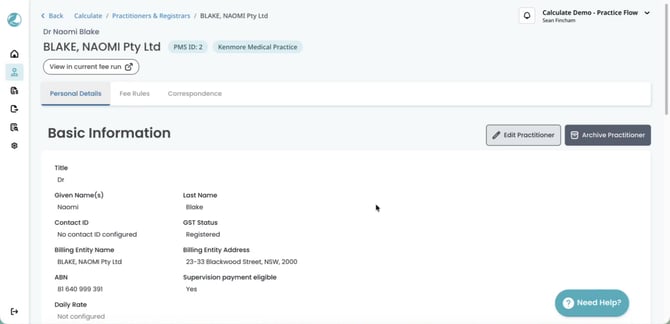
4. Turn on Include guarantee (found underneath the bank account).
Once Include guarantee is on, additional guarantee fields appear so you can match the guarantee to the arrangement in place with that practitioner.
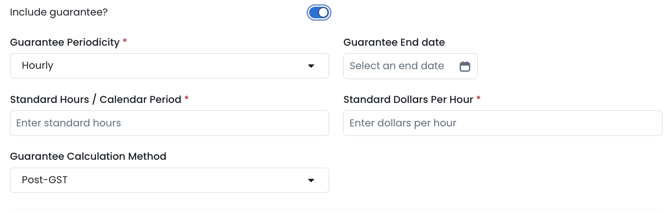
5. Complete the guarantee fields described in full below.
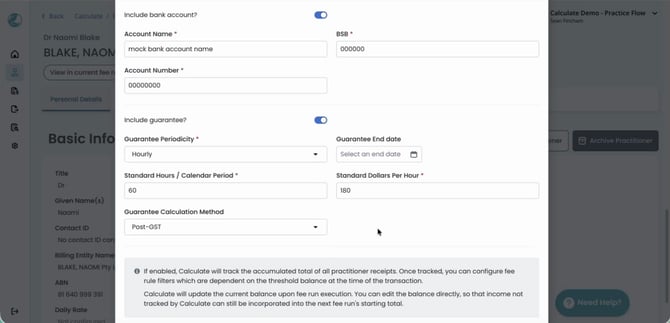
6. Select Update practitioner to save.
For more on setting up practitioners, please refer to our Knowledge Base article Configuring Practitioners in Calculate.
Setting the guarantee periodicity
The Guarantee Periodicity sets the multiplying factor used alongside the rate in the guarantee calculation. Choose the periodicity that matches the guarantee arrangement with the practitioner:
- Hourly (most common)
- Daily
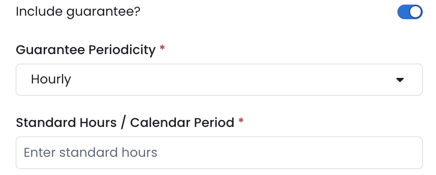
Enter the Standard Days/Hours Calendar Period and the Standard Dollars Per Day.
A calendar period is the week, fortnight or month the practice runs its disbursement and service fee calculations over. For example, 60 standard hours at $180.00 per hour gives a standard guarantee of $10,800.00 per calendar period.
Setting a guarantee end date
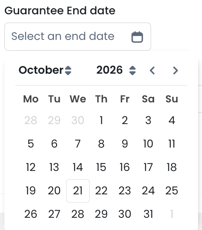
You can optionally select a Guarantee End date. It doesn’t affect the guarantee calculation, but it’s a useful reminder where a guarantee has been agreed for a fixed period of time.
When the end date falls within the current fee run period, Calculate flags the practitioner in the fee run with the error Contract ends during the current fee run period, shown under Errors / Notes in the practitioners list and under Potential Issues on the practitioner’s fee run page.
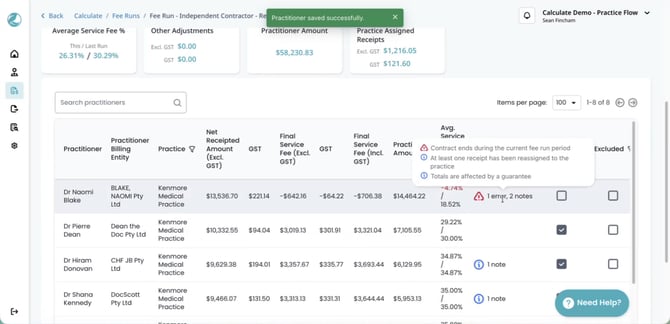
You can then either:
- Continue the guarantee: update the guarantee period and values.
- End the guarantee: turn off Include guarantee for the practitioner.
Note: The end date doesn’t stop the guarantee. It continues to apply in every fee run after the end date until Include guarantee? is turned off.
How the guarantee is calculated
The guarantee amount for each fee run is the hours multiplied by the hourly rate (or days multiplied by the daily rate) for the period. Calculate performs the normal disbursement calculation first, then compares the result to the guarantee amount.
- Normal disbursement is higher: no adjustment is made, and the practitioner is paid the normal disbursement.
- Guarantee amount is higher: Calculate reduces the practitioner’s service fee with a disbursement guarantee service fee adjustment, so the practitioner receives the guaranteed amount.
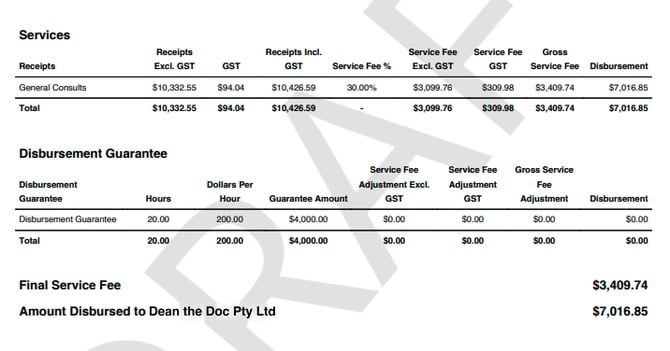
In the example below, the guarantee amount ($4,000.00) is lower than the normal disbursement ($7,016.85), so no adjustment is made.
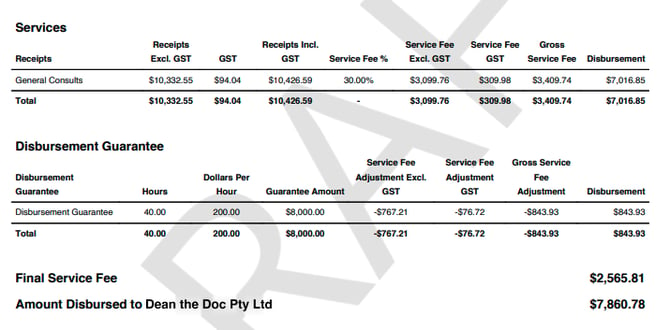
With the guarantee increased to 40 hours at $200.00 per hour ($8,000.00), the guarantee is higher, so the service fee is reduced by $767.21 (Excl. GST) and the amount disbursed increases.
Pre-GST and post-GST calculation
The Guarantee Calculation Method (Pre-GST or Post-GST) determines how GST is treated when Calculate works out the service fee adjustment. Both methods use the same guarantee amount, but they produce a different final service fee and amount disbursed.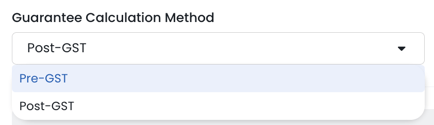
The examples below use the same fee run: receipts of $10,332.55 (Excl. GST) plus $94.04 GST, an initial service fee of $3,099.76 (Excl. GST), and a guarantee of 40 hours at $200.00 per hour ($8,000.00).
Pre-GST
The pre-GST method excludes GST on both the practitioner’s earnings and the final service fee. The service fee is reduced so that the practitioner’s receipts (Excl. GST) less the final service fee (Excl. GST) equals the guarantee amount.
| Amount | |
|---|---|
| Receipts (Excl. GST) | $10,332.55 |
| Less: Final service fee (Excl. GST): initial service fee $3,099.76 less guarantee adjustment $767.21 | $2,332.55 |
| Guarantee amount | $8,000.00 |
This is the more practitioner-favourable method. Once the practitioner has remitted and claimed GST with the ATO, they receive exactly the guaranteed amount: $7,860.78 disbursed, less $94.04 GST remitted on receipts, plus $233.26 GST claimed on the service fee, equals $8,000.00.
Post-GST
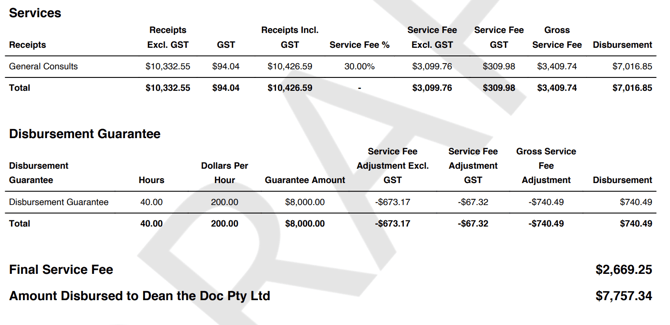
The post-GST method counts the GST credit the practitioner claims back on the service fee towards the guarantee. The service fee is reduced so that the amount disbursed plus the GST on the final service fee equals the guarantee amount.
| Amount | |
|---|---|
| Amount disbursed at the end of the fee run | $7,757.34 |
| Plus: GST on final adjusted service fee | $242.66 |
| Guarantee amount | $8,000.00 |
Here the service fee is reduced by $673.17 (Excl. GST), from $3,099.76 to $2,426.59, a final service fee of $2,669.25 including GST.
Comparing the two methods
| Pre-GST | Post-GST | |
|---|---|---|
| Final service fee (Excl. GST) | $2,332.55 | $2,426.59 |
| Amount disbursed | $7,860.78 | $7,757.34 |
| Practitioner’s position after GST is remitted and claimed | $8,000.00 | $7,905.96 |
The difference is the GST on the practitioner’s receipts ($94.04), which the pre-GST method leaves outside the guarantee calculation. As a result, the pre-GST method reduces the service fee by more ($767.21 compared with $673.17, Excl. GST).
TOP TIP! Before choosing a method, confirm with the practice which basis matches how they’ve historically calculated guarantees.
Viewing the guarantee in a fee run
1. Open the Fee run > View
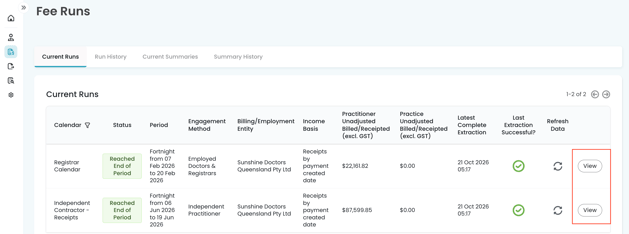
2. View Practitioner

3. Select Adjustments tab
The Disbursement Guarantee section shows the Standard Guarantee from the practitioner’s configuration, with the hours, dollars per hour and resulting Disbursement Guarantee. Select Practitioner Configuration to open the practitioner’s settings.
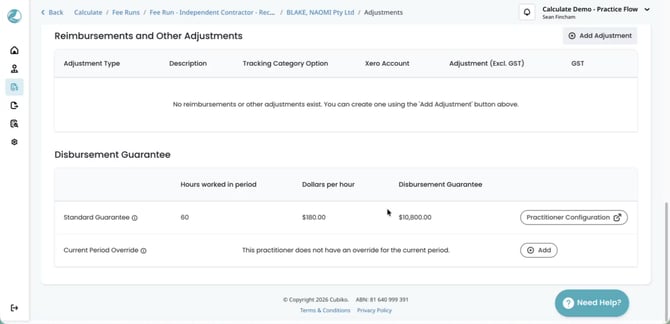
Where the guarantee needs to change for a single period only, select Add next to Current Period Override and enter the Hours Worked / Calendar Period and Dollars Per Hour for that period.
NOTE: This only affects the current calendar period and doesn’t change the practitioner’s configuration.
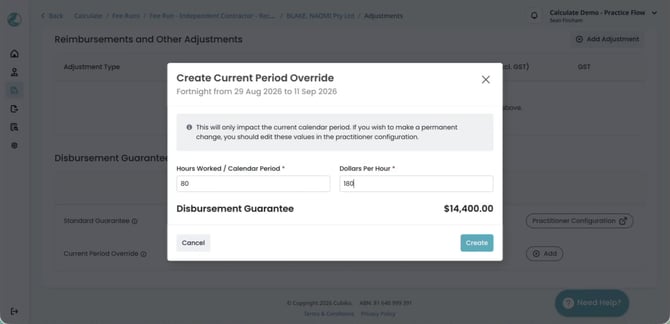
For a detailed overview of current period overrides, please refer to our Knowledge Base article Making Adjustments in Calculate.